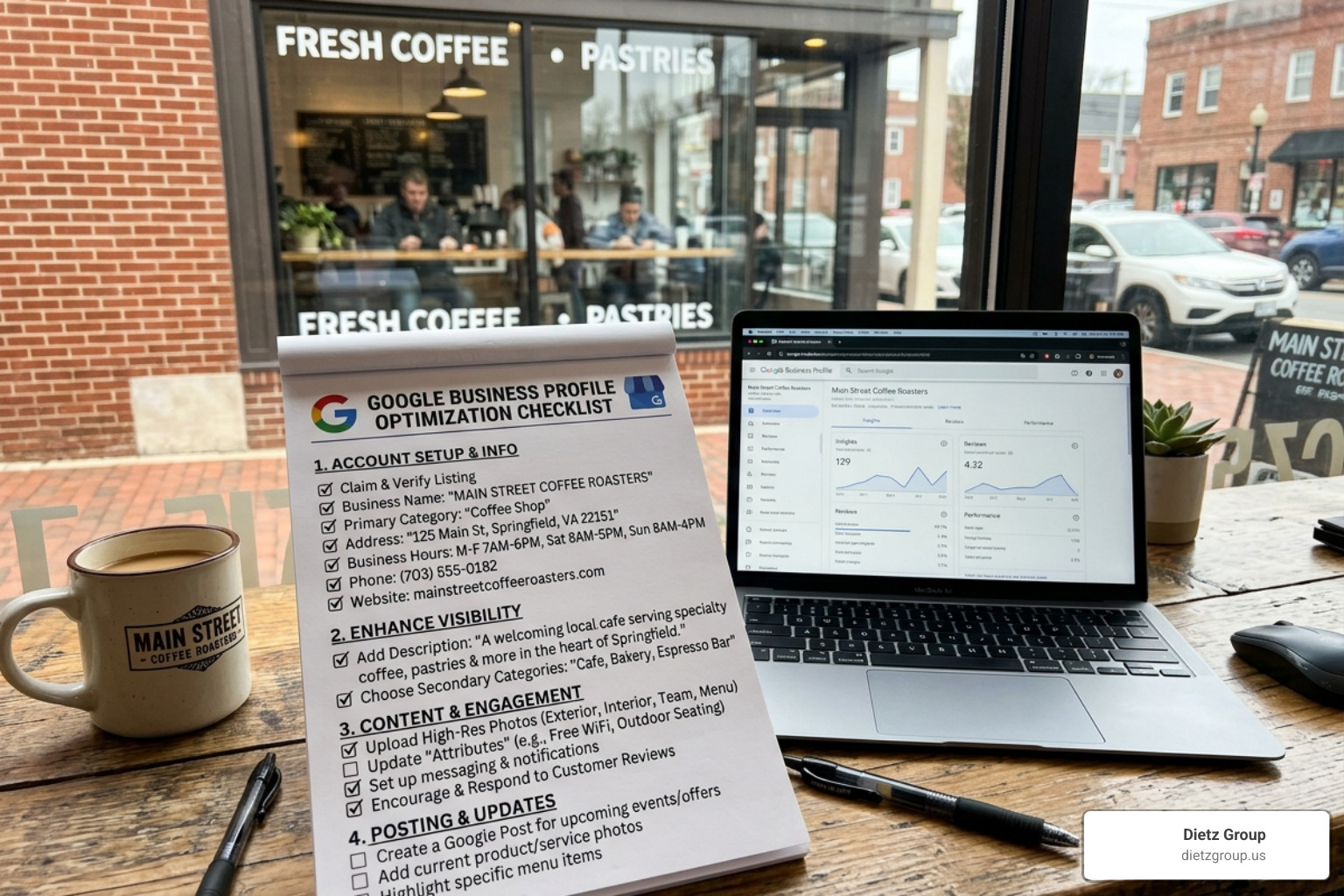
Why Your Google Business Profile Directly Impacts Local Customers Finding You
A google business profile optimization checklist gives you a clear, step-by-step path to rank higher in local search and turn more searchers into paying customers. Here’s what a fully optimized profile covers:
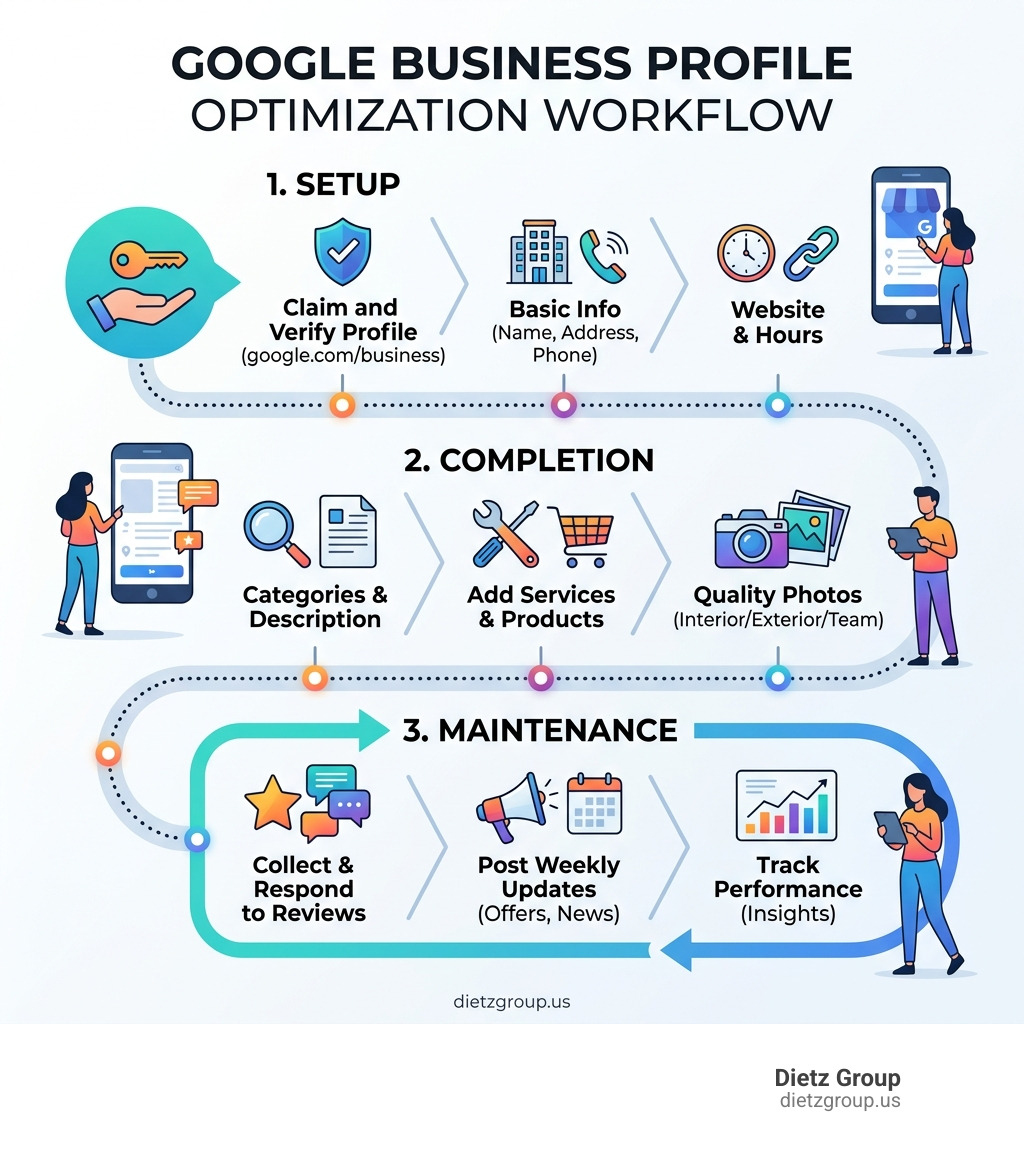
- Claim and verify your profile at google.com/business
- Complete all core info — business name, address, phone, hours, website
- Choose the right categories — primary category first, then relevant secondaries
- Write a strong business description — 750 characters, keyword-rich, customer-focused
- Upload quality photos — interior, exterior, team, and work examples
- Add services and products — with detailed descriptions
- Collect and respond to reviews — consistently and professionally
- Post weekly updates — offers, news, or project photos
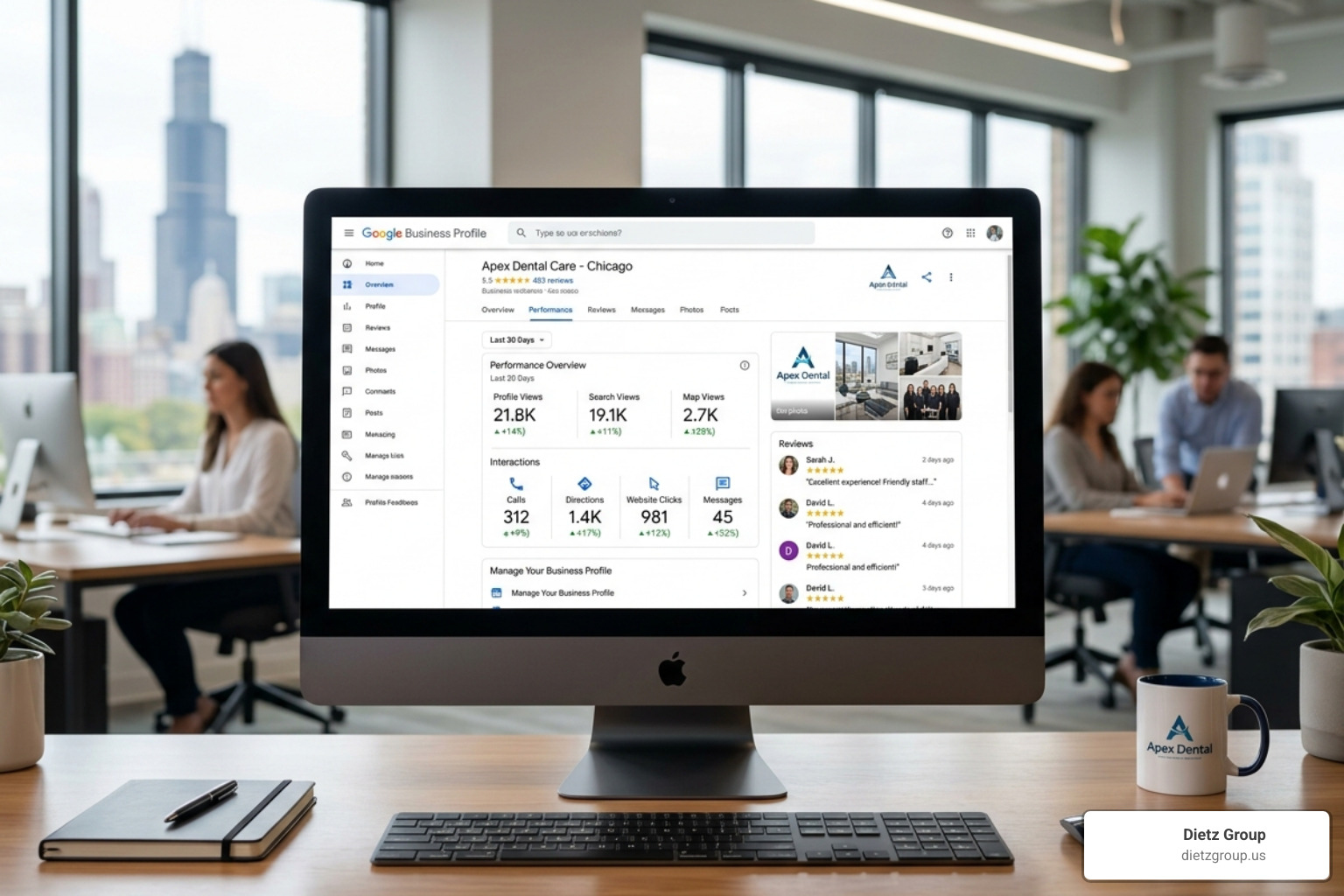
- Track your performance — check Insights monthly and adjust
If you have a local business, your Google Business Profile (GBP) is often the first thing a potential customer sees — before your website, before your ads, before anything else. It shows up in Google Search, Google Maps, and increasingly in AI-powered answers.
The stakes are high. Businesses with photos alone receive 42% more requests for driving directions and 35% more website clicks than those without. And with Google’s AI search features changing how results appear, a half-complete profile means missed calls, missed leads, and missed revenue.
The good news? Most of your competitors haven’t fully optimized theirs. That’s your opportunity.
I’m Rob Dietz, a digital marketing consultant and SEO expert with over 18 years of experience helping local businesses grow through Google — and building and refining a google business profile optimization checklist is one of the highest-impact things I do for clients. Let’s walk through exactly what you need to do.
The Foundation: Claiming and Verifying Your Profile
Before we can dive into the fun stuff like photos and posts, we have to handle the paperwork. Understanding what is a Google Business Profile is the first step; it is your digital storefront that Google controls. If you haven’t started yet, you might be wondering, “How do I get a Google Business Profile?” The process begins at google.com/business.
To be eligible, your business must have a physical location that customers can visit or provide services by traveling to customers at their locations. This means online-only businesses or e-commerce stores without a physical presence are generally ineligible.
When setting up ownership, use a business-branded email address rather than a personal Gmail account. This looks more professional and ensures the business retains control if employees leave. Once you’ve entered your details, Google requires verification to prove you are who you say you are. While the postcard method (where Google mails a code to your physical address) used to be the standard, Google is increasingly leaning toward Google Business Profile video verification tips to speed up the process.
Overcoming Verification Hurdles
Verification isn’t always a walk in the park. We often see challenges with Google Business Profile video verification, such as the upload failing or Google rejecting the footage. When performing a video verification, ensure you show your street sign, your branded vehicle, or your tools of the trade to prove your business exists at that location.
If video fails, you may still have options:
- Postcard: Takes 5–14 days. Don’t change your business info while waiting, or the code will be voided!
- Email/Phone: Only available to established businesses that Google already trusts.
- Search Console: If you’ve already verified your website in Google Search Console, you might get “instant verification.”
If you get stuck in a “verification loop,” your best bet is to contact GBP support through the help center. Keep screenshots of your attempts; they’ll often ask for them.
Core Information: The Google Business Profile Optimization Checklist Basics
Once verified, it’s time to fill in the blanks. The “basics” are actually the most important ranking factors. We recommend keeping a google business profile optimization checklist handy to ensure no field is left empty.
The golden rule of Local SEO is NAP consistency. This stands for Name, Address, and Phone number. This information must be identical across your website, social media, and your GBP. If your website says “Suite 100” but your GBP says “Ste 100,” Google might get confused. Here are 3 tips to optimize your Google Business Profile basics:
- Business Name: Use your real-world name. Do not add keywords like “Best Plumber Near Me” if your legal name is just “Joe’s Plumbing.” This is a fast track to suspension.
- Operating Hours: Keep these accurate. Nothing frustrates a customer more than driving to a “closed” sign when Google said you were open.
- Holiday Updates: Use the “Special Hours” feature for holidays. It tells Google (and customers) that your profile is actively managed.
Selecting Categories for Your Google Business Profile Optimization Checklist
Your Primary Category is arguably the single most important ranking factor you control. It accounts for roughly 32% of how Google decides if you are relevant to a search. Choose the category that best describes your core revenue-generating service. If you are a roofing contractor who occasionally does gutters, your primary category should be “Roofing contractor,” not “General contractor.”
You can add up to nine Secondary Categories. Use these to flesh out your other services. A great trick is to look at your top-ranked competitors using a tool or by simply searching for them. If they are outranking you, check what categories they are using—you might find a more specific one you missed.
Writing a High-Converting Business Description
You have 750 characters to tell your story. Don’t waste them on “We’ve been in business since 1992” (though that’s nice). Instead, focus on the customer. What problem do you solve? Where do you serve?
Lead with your most important keywords naturally. For example: “Providing expert HVAC repair and AC installation in your area for over 15 years. We offer 24/7 emergency service to keep your family comfortable year-round.” Avoid “fluff” and promotional gimmicks like “ALL CAPS” or “!!!!” as Google may reject the description.
Visual and Interactive Content for Higher Engagement
Photos are not just “nice to have.” They are engagement signals. According to industry research, businesses with consistent photo updates see significantly higher interaction rates. Google’s own Business Profile photo guidelines are a useful reference for image quality, formatting, and best practices.
- Logo: High resolution, minimum 720x720px.
- Cover Photo: This is your “billboard.” Use a 1024x576px landscape image that represents your brand.
- Interior/Exterior: Show customers where you are. Exterior shots help people find your building, and interior shots build trust.
- Team & Work: Upload at least 10+ photos of your actual work. If you’re a landscaper, show before-and-afters. If you’re a lawyer, show your professional office and team.
Avoid stock photos at all costs. Google’s AI can recognize stock images, and they do nothing to build trust with a local customer.
Leveraging Google Posts and Products
Think of Google Posts as social media for your search listing. You should aim to post at least once a week. These posts expire from the main view after seven days (though they remain in your history), so a weekly cadence keeps your profile looking “fresh” to both Google and users.
Use Product Catalogs even if you are a service business. You can list your main services as “products” with detailed descriptions. This gives you more real estate on the search results page and allows you to include even more keywords. For a deep dive, check out our Ultimate Google Business Profile Management Guide.
Mastering Reviews and Customer Interaction
Reviews are the lifeblood of local search. Google looks at three things: Volume (how many), Rating (star level), and Velocity (how fast you are getting new ones). A business with 50 reviews from three years ago will likely be outranked by a business with 20 reviews from the last three months.
Your response strategy matters just as much as the reviews themselves. Respond to every review—positive or negative—within 24 to 48 hours. When you respond, you aren’t just talking to the reviewer; you are talking to every future customer who reads that review.
If you get a negative review, stay professional. Acknowledge the issue, apologize, and offer to take the conversation offline. Never argue publicly. Also, don’t forget to learn how to talk to your customers with Google Business Profile Chat. Enabling messaging allows high-intent customers to ask questions directly from the search results.
Engineering Justification Triggers through Q&A
Have you ever seen a Google result that says “Their website mentions ’emergency pipe repair'” or “A review mentions ‘fast service'”? Those are called Justifications. You can help “engineer” these by using the Q&A section.
You are allowed to post your own questions and answer them. This is a great way to pre-seed your profile with FAQs. For example:
- Q: “Do you offer 24/7 emergency HVAC repair in your city?”
- A: “Yes! We provide 24/7 emergency repairs for all AC and heating systems.”
This helps Google understand your services better and provides instant value to the user. For more expert tips, we often discuss these strategies in our Google Business Profile Webinar.
Advanced Strategies for AI and SGE Readiness
The world of search is changing. With Google’s AI Overviews (formerly SGE), the way customers find you is becoming more conversational. Google’s AI scans your reviews, your posts, and your service descriptions to answer complex queries like “Who is the best-reviewed plumber in my area that offers financing?”
To be “AI-Ready,” your profile needs to be an “entity” that Google fully understands. This means having a Google Business Profile Management plan that focuses on AI and Local SEO GBP integration. This includes using conversational language in your descriptions and ensuring your website’s LocalBusiness schema markup perfectly matches your GBP data.
| Feature | Storefront Business | Service-Area Business (SAB) |
|---|---|---|
| Address | Must be visible to public | Can be hidden from public |
| Map Pin | Exact location shown | Shows a general service radius |
| Verification | Usually via postcard or video | Often requires video of tools/van |
| Customer Interaction | In-person at your location | In-person at customer’s location |
Maintaining Your Google Business Profile Optimization Checklist Monthly
Optimization isn’t a “one-and-done” task. It’s a living asset. If you “set it and forget it,” your rankings will eventually slip as competitors stay active. We recommend a monthly audit schedule:
- Check Insights: Look at how many people called you or asked for directions.
- Audit NAP: Ensure no one (including Google’s automated “helpful” edits) has changed your phone number or hours.
- Review Content: Upload 2–5 new photos and publish 4 weekly posts.
- Citation Cleanup: Ensure your business info is consistent across the web (Yelp, Bing, etc.).
Google ranks you based on Relevance (how well you match the query), Distance (how close you are to the searcher), and Prominence (how well-known and trusted you are). Consistent maintenance builds that prominence. If this feels like too much to handle, many businesses look into Google Business Profile Management Services to keep their edge.
Frequently Asked Questions about GBP Optimization
How long does it take to see results from GBP optimization?
In our experience, a good SEO campaign takes 12-18 months to see significant, sustainable results. While you might see small “pops” in ranking within 30–60 days of completing your google business profile optimization checklist, Local SEO is a marathon, not a sprint. It takes time for Google to trust your new data and for your review velocity to outpace competitors.
Can I use a virtual office or P.O. Box for my address?
No. This is one of the most common reasons for immediate suspension. Google requires a physical, verifiable location where you conduct business. Virtual offices and P.O. Boxes do not qualify. If you work from home, you should list your home address for verification but set your profile as a “Service-Area Business” to hide your address from the public.
How often should I post on my Google Business Profile?
You should post at least once per week. While posts don’t “expire” into oblivion anymore, they are pushed down by newer content. Regular posting sends a strong “engagement signal” to Google that your business is active, which can help maintain your rankings in the Local Pack.
Conclusion
Dominating local search doesn’t happen by accident. It requires a strategic approach, a commitment to accuracy, and a consistent presence. By following this google business profile optimization checklist, you are building a foundation that will serve your business for years to come.
At Dietz Group, we bring over 18 years of expertise and advanced AI technology to help businesses like yours win the local search war. We focus on high-intent searches—finding the people who are ready to buy right now—and delivering high-ROI results.
Ready to take your visibility to the next level? Dominate local search with a Local Search Boost and let us help you turn Google into your most powerful lead-generation tool.