Why Your Google Profile Audit Could Be the Fix Your Local Visibility Needs
A google profile audit is one of the fastest ways to find out why your business isn’t showing up where it should in local search — and what to do about it.
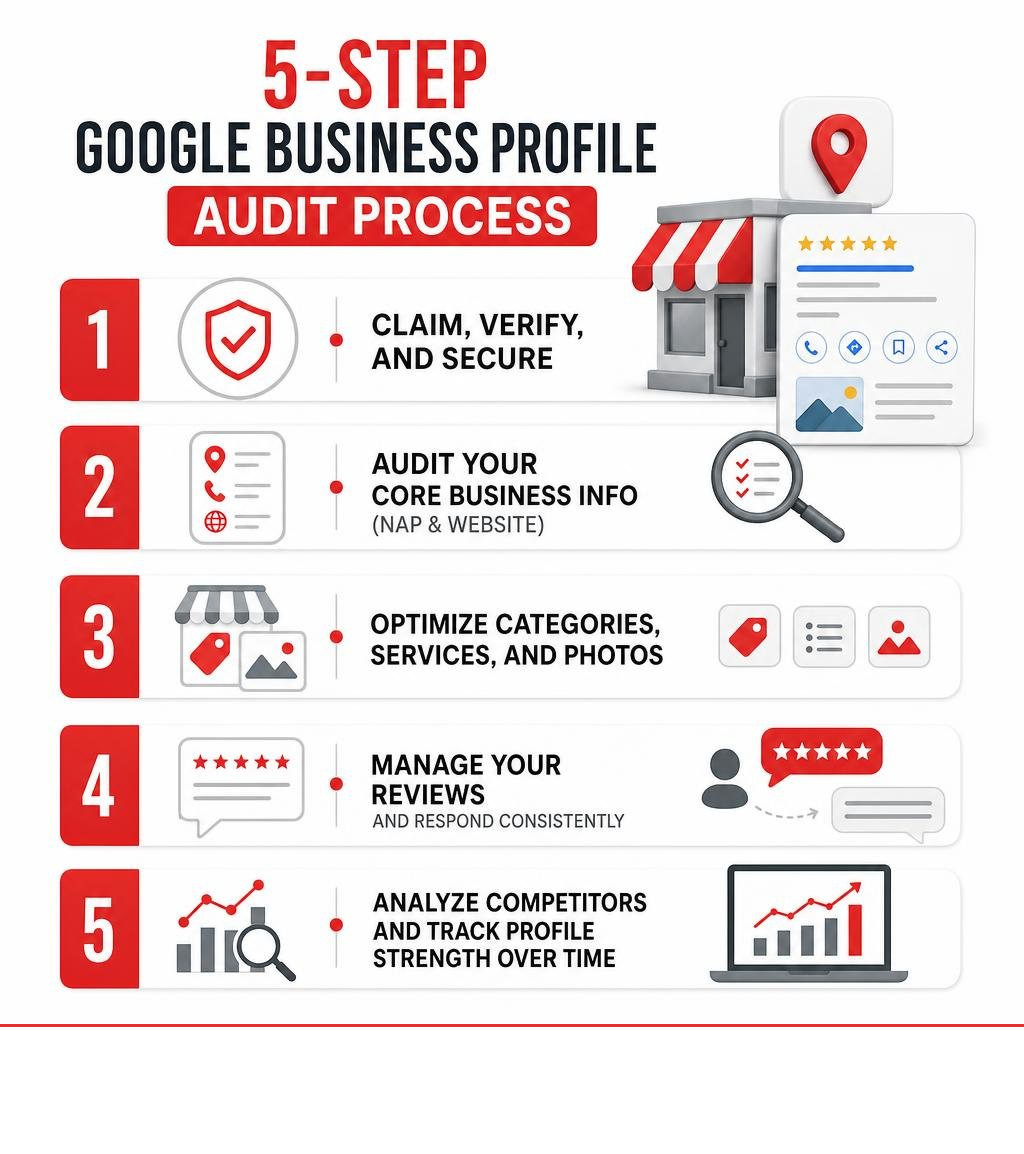
Here’s a quick overview of the 5 steps covered in this guide:
- Claim, verify, and secure your Google Business Profile
- Audit your core business info — name, address, phone, and website URL
- Optimize categories, services, and photos for maximum relevance
- Manage your reviews and respond consistently
- Analyze competitors and track your profile strength over time
Your Google Business Profile is often the first thing a potential customer sees before they ever visit your website. If the information is outdated, incomplete, or inconsistent, Google may rank a competitor above you — even if your business is the better choice.
The amount of businesses running with wrong phone numbers, old website links, or missing categories is staggering. Each of those gaps costs you real customers.
A regular audit fixes that.
I’m Rob Dietz, founder of the Dietz Group and a digital marketing consultant with over 18 years of experience helping small businesses improve their local search visibility — including running google profile audits for clients across a wide range of industries. Let’s walk through exactly how to do it.
Quick google profile audit terms:
Why a google profile audit is Essential for Local SEO and GEO
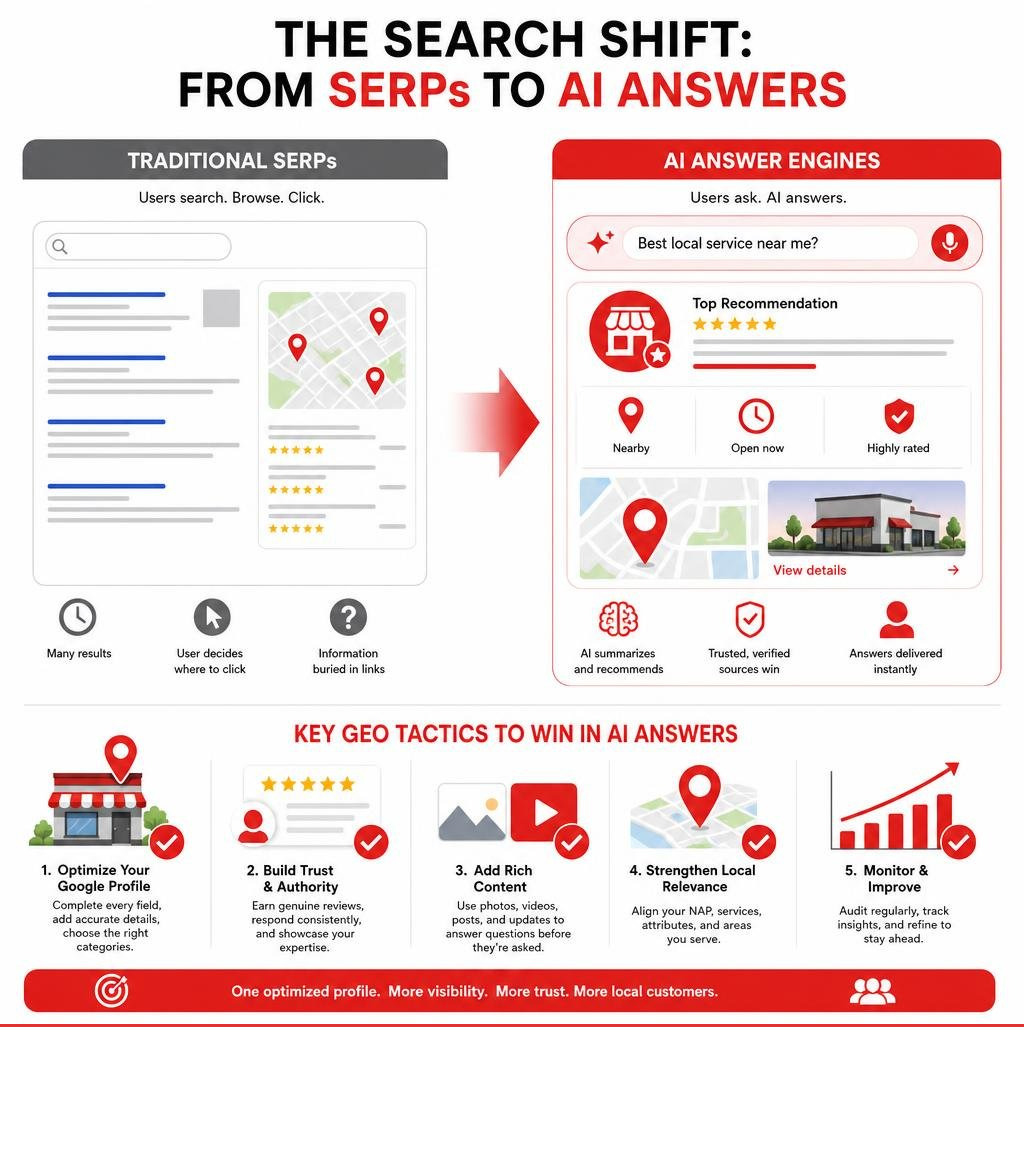
In July 2026, local search is no longer just about traditional search engine listings. The digital landscape has shifted dramatically toward AI-driven answers, Generative Engine Optimization (GEO), and interactive local maps. When customers ask AI search engines or conversational assistants for the “best local service near me,” these systems pull data directly from verified, highly optimized sources. If your digital storefront is neglected, you simply won’t exist in these AI overviews.
Understanding What Is a Google Business Profile? is the first step. It is the single most important asset for local search engine optimization. When we perform a google profile audit, we aren’t just checking boxes; we are training Google’s AI systems and local algorithms to trust your business as the most relevant, prominent, and authoritative option in your area.
SEO vs. PPC for Local Lead Generation
Many business owners wonder whether they should invest in search engine optimization (SEO) or pay-per-click (PPC) advertising. While PPC can drive immediate traffic, it requires continuous funding—the second you stop paying, your leads disappear.
Conversely, local SEO and GEO build long-term digital equity. A well-optimized profile continues to generate highly qualified, high-intent organic leads without ongoing ad spend. However, patience is required: a good SEO campaign typically takes 12 to 18 months to yield its full, compounding results.
| Feature | Local SEO & GEO | Pay-Per-Click (PPC) |
|---|---|---|
| Upfront Investment | Low to Moderate (Focus on optimization) | High (Continuous budget required) |
| Time to See Results | 12–18 months for maximum compounding ROI | Near-instant visibility |
| Sustainability | High (Maintains traffic after optimization) | Zero (Traffic stops when budget runs out) |
| AI Search Visibility | High (Feeds data directly to AI search engines) | Limited (AI overviews prioritize organic entities) |
| Authority & Trust | High (Builds organic credibility and reviews) | Moderate (Clearly marked as sponsored) |
By systematically auditing your profile, you build a foundation that outlasts temporary ad campaigns and positions your brand at the absolute top of both traditional map packs and modern AI answer engines.
Step 1: Claim, Verify, and Secure Your Google Business Profile
Before you can optimize your profile, you must have full, secure ownership of it. If you haven’t done so already, you need to learn How Do I Get a Google Business Profile? and claim your listing.
The Verification Process
Google requires businesses to verify their physical location to prevent spam and fraudulent listings. Depending on your business category and location, Google may offer several verification methods:
- Video Verification: This is increasingly the standard method. You will need to record a continuous video showing your business’s physical surroundings, your official signage, and proof that you have access to the business tools or workspace. For a smooth process, review our Google Business Profile Video Verification Tips.
- Phone or Email: Available to select established businesses. You will receive a one-time verification code.
- Postcard: Google mails a physical postcard with a verification code to your business address, which typically arrives within five business days.
Securing Your Associated Google Account
A compromised Google Account can lead to your business listing being hijacked, altered, or suspended entirely. Part of a thorough google profile audit involves securing the primary Google account associated with your profile.
You should regularly perform a quick security health check on your account to ensure your security settings are airtight. This involves:
- Enabling two-factor authentication (2FA) using an authenticator app or security key.
- Reviewing and removing unrecognized devices or third-party applications with account access.
- Updating your recovery phone number and backup email address.
By protecting the account that owns your listing, you safeguard your local search rankings and ensure that unauthorized users cannot alter your public business information.
Step 2: Audit Core Business Information for NAP Consistency
Consistency is the cornerstone of local search prominence. Search engines crawl hundreds of directories across the web to verify that your business is legitimate. If your information is inconsistent, search algorithms lose trust in your data, which can negatively impact your local visibility.
The acronym NAP stands for Name, Address, and Phone number. During this phase of your audit, you must ensure your NAP data is identical across your Google Business Profile, your official website, and all major third-party directories.
1. Business Name
Your registered profile name must match your real-world business name exactly as it appears on your physical signage, business license, and website. Avoid “keyword stuffing” (e.g., adding “Best Plumber in Town” to your actual business name of “Plumbing Pros LLC”). Google frequently suspends profiles that use spammy, keyword-stuffed titles. For step-by-step guidance on setting up your listing correctly, refer to The Ultimate Guide to Google Business Profile Setup.
2. Physical Address
If you have a physical storefront, ensure the address is formatted correctly and matches the USPS database. If you are a Service Area Business (SAB) and serve customers at their locations (such as a mobile locksmith or electrician), you should hide your physical home address on the profile and define your service areas by cities, counties, or zip codes instead.
3. Phone Number
Use a local phone number that matches the contact number on your website. If you use a call-tracking phone number to measure campaign performance, place the tracking number in the primary phone field and your main, local business line in the secondary phone field. This preserves your local search consistency while allowing you to track incoming leads.
4. Website URL
Ensure your website link is active, secure (using HTTPS), and points to a page that matches your business location. If you are a single-location business, link directly to your homepage. For tracking purposes, we highly recommend adding UTM tracking parameters to your website URL. This allows you to see exactly how much traffic and how many leads are driven directly from your Google Business Profile in your web analytics platform.
Step 3: Optimize Categories, Services, and Visual Content
Once your core information is accurate, the next step in our google profile audit is optimizing the areas that directly influence what searches you rank for: categories, services, and visual media.
Choosing the Right Categories
Your primary category is the single most powerful driver of your local ranking. It tells Google’s algorithm exactly what your business is, not just what it does.
- Primary Category: Choose the most specific category that matches your core business. For example, if you are an elder law specialist, select “Elder Law Attorney” rather than a general “Attorney” category.
- Secondary Categories: Add relevant secondary categories to capture additional search queries. If you run a full-service salon, your primary category might be “Hair Salon,” while your secondary categories could include “Nail Salon” and “Facial Spa.” Avoid over-categorizing with irrelevant options, as this can dilute your profile’s authority.
Building Your Services and Products List
Take the time to manually build out your services list. Write clear, detailed descriptions for each service you offer. This structured data helps Google understand your business offerings, making you more likely to appear in specific, long-tail local search queries and AI-generated overviews.
Polishing Your Visual Content
High-quality photos and videos build immediate trust with potential customers. Profiles with active, high-quality imagery receive significantly more website clicks and requests for directions.
- Owner-Uploaded Photos: Regularly upload high-resolution images of your office interior, exterior signage, team members, and completed work.
- User-Uploaded Photos: Encourage your clients to upload their own photos when they leave reviews. Google highly values user-generated visual content.
- Format and Size: Aim for clear, well-lit photos in JPG or PNG format. For your profile picture, a resolution of at least 256 x 256 pixels is recommended, while cover images should ideally be 1080 x 1350 pixels or higher.
To ensure you haven’t missed any opportunities in this phase, review Your Essential Google Business Profile Optimization Checklist. For individual creators or publishers looking to manage their broader personal brand on Google, you can also explore how to claim a Google for Creators | Search Profile and learn how to Manage your Search profile – Google Search Help .
Step 4: Manage Reviews and Leverage AI-Driven Responses
Reviews are a primary ranking factor in local SEO and play a massive role in user conversion. AI search engines analyze the sentiment and specific keywords within your reviews to determine your business’s prominence and trustworthiness.

Building an Active Review Strategy
You should have an ongoing, proactive strategy to generate fresh, authentic customer reviews. Google’s algorithm prioritizes profiles that receive steady, consistent reviews over those that get a burst of feedback and then go silent.
Best Practices for Review Responses
You must respond to every review—both positive and negative. Responding demonstrates to both Google and prospective customers that you are engaged and value feedback.
- Positive Reviews: Thank the customer, mention the specific service they received, and keep your tone warm and professional.
- Negative Reviews: Respond promptly, remain polite, and avoid getting defensive. Offer to take the conversation offline to resolve the issue. This shows onlookers that you handle criticism constructively.
Leveraging AI Responsibly
With modern AI technology, you can streamline your review management process. AI-driven response generators can help you draft natural, professional, and context-aware replies in seconds. However, always review and edit these drafts before publishing to ensure they sound authentic to your brand voice.
To understand how public contributions interact with your broader digital footprint, you can learn how to Control what others see about you across Google services – Computer – Google Account Help . For a deeper dive into making your business listing stand out, check out our guide on How to Make Google Fall in Love with Your Business Profile. You can also manage your public visibility across other Google surfaces by reviewing the official documentation About your Google profile, Search, App & Discover – Computer – Google Search Help .
Step 5: Analyze Competitors and Monitor Profile Strength
The final step of your google profile audit is evaluating your performance against your local competitors and tracking your profile’s overall strength. Local search is a zero-sum game; to move up in the rankings, you have to out-optimize the businesses currently occupying the top spots.
1. Identify Your Top Competitors
Search for your primary keywords in your target geographic area. Identify the top three businesses appearing in the local map pack. These are the listings you need to benchmark against.
2. Analyze Competitor Listings
Look closely at what your top-ranking competitors are doing right:
- What is their primary business category?
- How many reviews do they have, and what is their average rating?
- How frequently do they upload new photos or publish updates?
- Are they linking to localized landing pages on their websites?
3. Monitor Your Profile Strength
Google provides a basic “Profile Strength” meter within your dashboard to show how complete your information is. While a 100% completion score is a great starting point, true optimization goes much deeper.
For a complete manual assessment of your listing’s health, read Is Your Google Business Profile Slacking? Here Is How To Audit It. If you prefer an expert, hands-on evaluation, we offer comprehensive auditing services to identify and resolve hidden issues. To learn more about how we can help you dominate your local market, explore our Google Business Profile Management services and check out our Killer GBP Growth Tactics for Dominating Local Search.
Frequently Asked Questions about Google Profile Audits
How often should I perform a google profile audit?
We recommend performing a comprehensive google profile audit at least once every quarter. However, you should check your profile weekly for any suggested edits from the public or automated changes made by Google’s AI. Regular maintenance ensures your business hours, holiday closures, and services remain perfectly accurate year-round.
What is the difference between a manual google profile audit and automated audits?
Automated audits are excellent for quickly checking basic metrics, such as whether your business phone number is missing or if your profile completeness score is low. However, a manual audit performed by an experienced local SEO specialist goes much deeper. A manual review analyzes local competitor strategies, identifies subtle category opportunities, ensures true NAP consistency across complex directories, and aligns your profile with your long-term business goals.
How does a Google Business Profile audit impact AI search answers?
AI search engines and generative answer engines rely on highly structured, verified, and authoritative data to provide local recommendations. By conducting a thorough audit—ensuring your categories are precise, your NAP is consistent, and your reviews reflect positive customer sentiment—you provide the clear entity signals that AI systems need to confidently recommend your business in conversational search results.
Take Control of Your Local Search Presence
A fully optimized Google Business Profile is the most valuable digital asset your local business can own. It acts as your 24/7 digital storefront, welcoming high-intent customers and feeding crucial data directly to modern search engines and AI answer engines.
While a basic audit can be completed relatively quickly, maintaining top local rankings requires continuous monitoring, strategic review management, and expert optimization. At the Dietz Group, we leverage over 18 years of digital marketing expertise and cutting-edge strategy to help businesses dominate local search results and maximize their ROI.
Ready to stop losing high-value local leads to your competitors? Let our team of local SEO experts handle the heavy lifting for you. Explore our professional Google Business Profile Management Services today, and let’s build a strategy that puts your business at the top of every local search.