Why Your Business Needs a Google Business Profile Right Now
Google Business Profile setup is one of the most impactful things a local business owner can do to get found online. Here’s a quick overview of how to get started:
- Sign in to a Google Account (or create one)
- Go to business.google.com/add and click Add your business to Google
- Enter your business name and select your business type
- Add your location or service area
- Verify your business using Google’s available verification method
- Complete your profile with hours, photos, and a business description
Think about this: more than 50% of mobile users who search for local goods and services visit a business they found on Google within a single day. And 18% make a purchase within that same day.
If your business isn’t showing up on Google Search and Maps, you’re invisible to a huge chunk of potential customers who are ready to buy.
A Google Business Profile (formerly called Google My Business) is a free tool from Google that puts your business in front of those customers. It shows your hours, location, photos, reviews, and more — all in one place, directly on Google Search and Maps.
The best part? It costs nothing to set up or maintain.
I’m Rob Dietz, founder of the Dietz Group and a Google Ads Search Partner with over 18 years of digital marketing experience — and google business profile setup is one of the foundational strategies I’ve used to help local businesses grow their online visibility since 2008. In this guide, I’ll walk you through everything you need to know to set up, verify, and optimize your profile the right way.
Similar topics to google business profile setup:
Why Google Business Profile Setup is Essential in 2026
In the current digital landscape of May 2026, your online presence is often the first “handshake” you have with a customer. According to industry research, businesses that maintain complete Google Business Profiles are considered twice as likely to be viewed as reputable by users. This isn’t just about having a digital business card; it’s about establishing trust before a customer even picks up the phone.
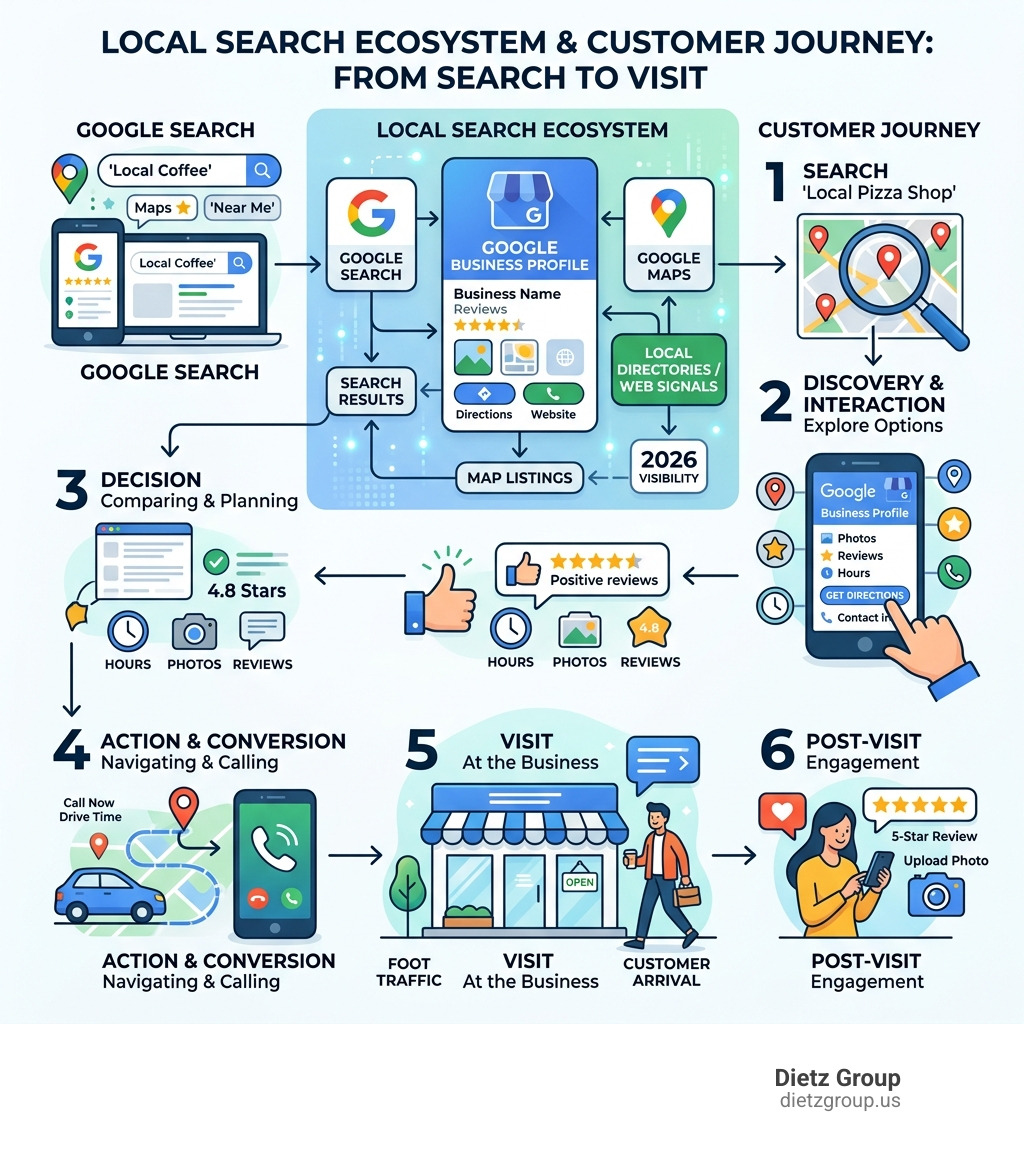
What is a Google Business Profile? Simply put, it is a free listing that allows you to manage how your business appears across Google Search and Maps. When you Get Listed on Google, you are claiming your stake in the local search ecosystem.
For local SEO, this profile is the engine. It helps Google understand where you are and what you do, allowing you to appear in the “Local Pack”—that coveted box at the top of search results showing a map and three local businesses. Without a proper google business profile setup, you are essentially invisible to the 50% of mobile searchers who are looking for immediate local solutions.
Step-by-Step Google Business Profile Setup
Setting up your profile is a straightforward process, but doing it correctly requires attention to detail. We recommend using a company-branded email address for your Google Account to ensure long-term security and professional management.
Getting Started
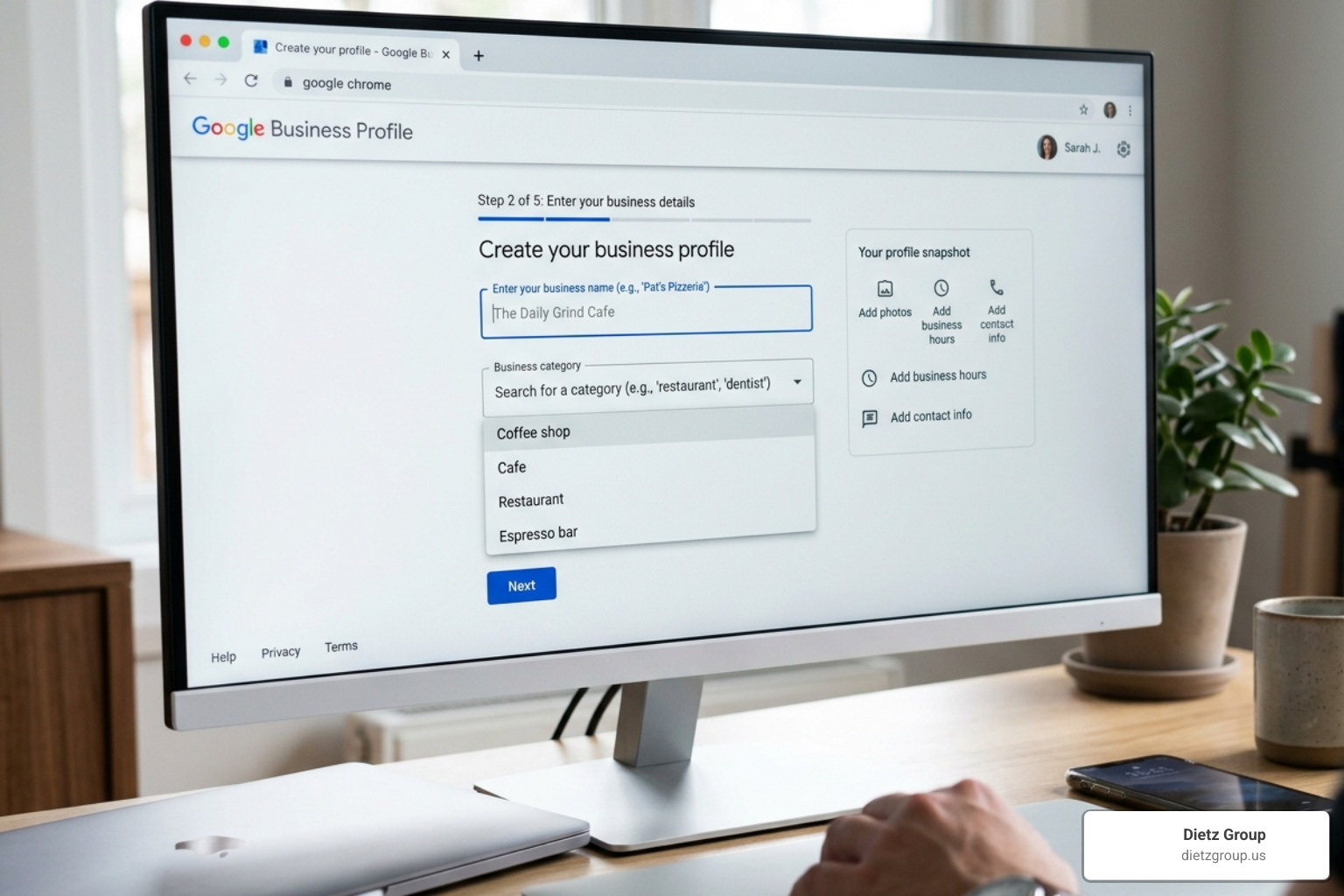
To begin, navigate to the Sign up for Business Profile page. You will be asked to enter your business name. If your business appears in a drop-down menu, it means a profile already exists, and you may need to claim it. If not, click “Add your business to Google.”
Selecting Your Category
Choosing the right category is vital for how you get a Google Business Profile to perform well. Your primary category should describe what your business is, not just what it sells. For example, choose “Italian Restaurant” rather than just “Restaurant.”
Storefront vs. Service Area
You must decide how you interact with customers:
- Storefront Businesses: You have a physical location (like a retail shop or hair salon) where customers visit you.
- Service-Area Businesses (SABs): You visit or deliver to customers (like a plumber or a cleaning service). You can list up to 20 service areas, but Google recommends keeping them within a 2-hour driving radius of your base.
- Hybrid Businesses: You have a storefront but also deliver or serve customers at their locations.
Important Note: Online-only businesses, rental properties, or vacation homes are generally not eligible for a Business Profile. Google requires face-to-face interaction with customers during stated business hours.
Adding or Claiming Your Business Listing
If you find that your business is already listed but you didn’t create it, don’t worry. This often happens because Google pulls data from various third-party sources. You can follow the official Google guide to add or claim your Business Profile.
To claim an existing listing:
- Search for your business name and city on Google Search or Maps.
- Look for a link that says “Own this business?” or “Claim this business.”
- Click “Manage now” and follow the prompts.
If the profile is already verified by someone else, you will need to “Request Access.” Google will send an email to the current owner, and they will have a few days to respond. If you are the authorized manager and they don’t respond, Google may grant you the ability to verify your relationship with the business and take over the listing.
Navigating the Google Business Profile Setup Verification Process
Verification is the most critical step. Until you are verified, your edits won’t be visible to the public, and you won’t be able to respond to reviews. Google determines the verification method for you based on your business type and region.
According to Google Business Profile Help, common methods include:
- Video Verification: This is becoming the standard. You’ll need to record a continuous video showing your location (street signs), your business (branded equipment or storefront), and proof of management (opening the door with a key or accessing a POS system). Check out our Google Business Profile Video Verification Tips for a higher success rate.
- Postcard: Google sends a physical postcard with a 5-digit code to your business address. Most arrive within 14 days. Warning: The code expires after 30 days, and you should not edit your business name or category while waiting, as this can void the request.
- Phone or Email: Some established businesses may be offered a quick code via text, call, or email.
- Live Video Call: In some cases, you may need to join a live call with a Google representative to show your workspace.
Once you submit your verification, Google typically reviews it within 5 business days.
Optimizing Your Profile for Maximum Visibility
Once verified, the real work begins. A “set it and forget it” approach won’t help you dominate local search. You need to make Google (and your customers) fall in love with your profile.
| Feature | Basic Profile | Fully Optimized Profile |
|---|---|---|
| Photos | 1-2 grainy smartphone shots | 20+ high-res interior, exterior, and team photos |
| Description | “We are a local plumber.” | 750-character engaging story with keywords |
| Hours | Standard 9-5 | Updated holiday, special, and service-specific hours |
| Attributes | None | Identifies as veteran-owned, wheelchair accessible, etc. |
| Engagement | No review responses | 100% response rate to all reviews |
Business Description and Photos
You have 750 characters to describe your business. Use them wisely! Focus on what makes you unique and include keywords that your customers actually search for.
Photos are equally vital. Profiles with photos receive significantly more requests for directions and website clicks. We recommend uploading high-resolution logos, cover photos, and “behind-the-scenes” shots of your team in action. For more details, see our 3 Tips to Optimize Your Google Business Profile.
Managing Details
Don’t neglect the small stuff. Ensure your operating hours are always accurate, especially during holidays. If you’re a restaurant, use the menu management tools to list your dishes and prices. If you’re a service provider, list your top 15 services with clear descriptions. These details help you make Google fall in love with your Business Profile.
Managing Reviews and Customer Engagement
Customer reviews are the lifeblood of local reputation. We have found that responding to every review—both positive and negative—signals to Google that you are an active, trustworthy business.
Beyond reviews, you can talk to your customers with Google Business Profile Chat. This allows users to message you directly from your listing. Additionally, features like “Order with Google” or “Reserve with Google” allow customers to take action immediately without ever leaving the search results page.
Advanced Management and Troubleshooting
As your business grows, you might encounter more complex issues. Managing a profile isn’t always smooth sailing, and you may face technical hurdles.
Insights and Analytics
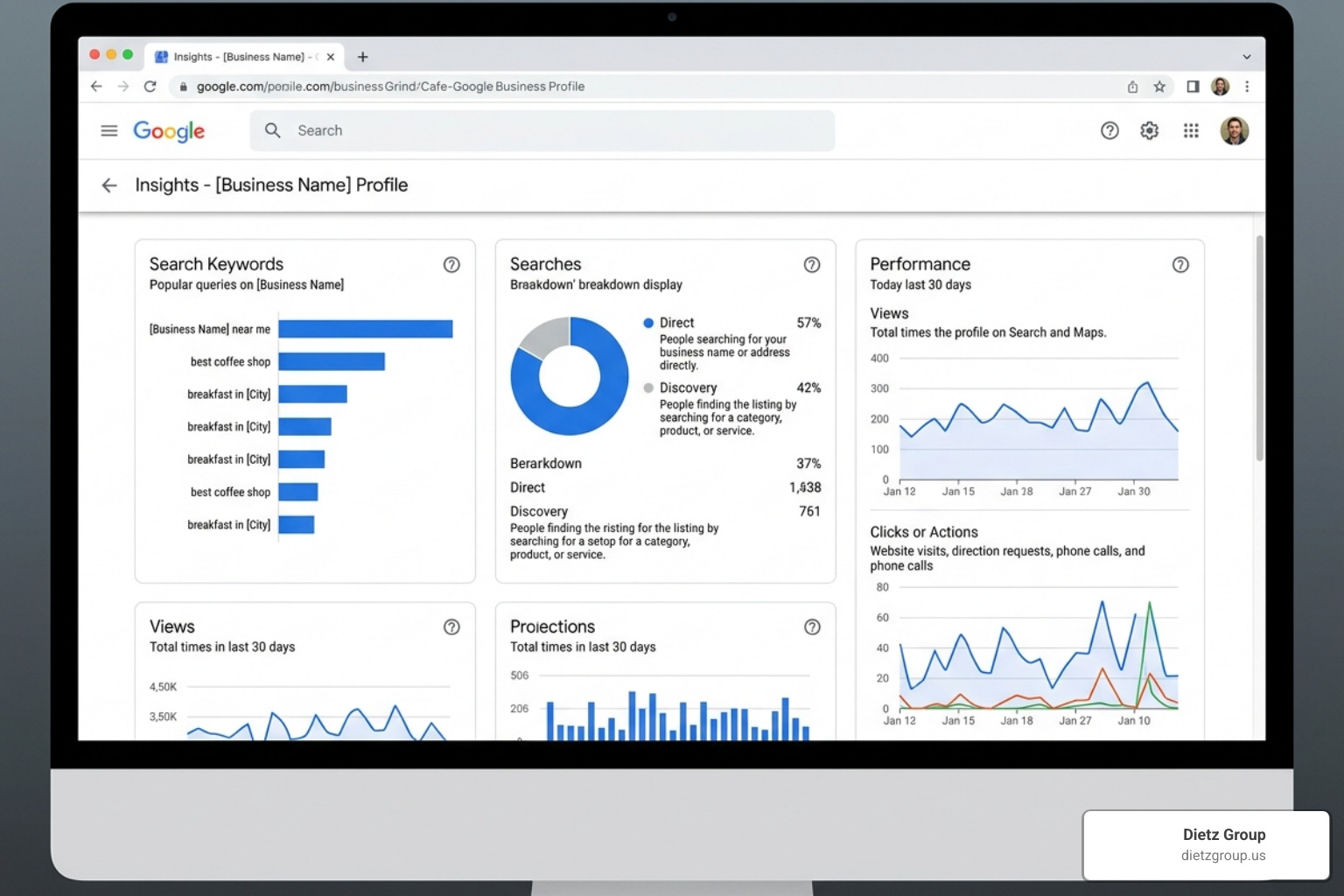
Your profile provides a wealth of data through the “Insights” tab. You can see:
- How many people found you via “Direct” search vs. “Discovery” search.
- The specific keywords customers used to find your listing.
- Where on the map people are when they request directions to your shop.
- The number of phone calls and website clicks generated by the profile.
For a deeper dive into these metrics, refer to our Ultimate Google Business Profile Management Guide.
Common Mistakes and How to Avoid Them
We often see businesses make avoidable errors during google business profile setup:
- Duplicate Profiles: Having more than one listing for the same location can lead to suspensions.
- Keyword Stuffing: Adding keywords to your business name (e.g., “Main Street Pizza – Best Pizza in Town”) is a violation of Google’s terms and will likely get you suspended.
- Inconsistent NAP: Your Name, Address, and Phone number must be identical across the web.
- Verification Failure: If your verification fails, check your address guidelines and ensure you aren’t using a P.O. Box or a virtual office, which Google generally prohibits.
If you find yourself in a Google Business Profile Management crisis—like a suspension or an ownership dispute—reach out to Google Support or an expert who can help navigate the reinstatement process.
Professional Google Business Profile Setup and Maintenance
While the tools are free, the time and expertise required to stay on top of Google’s constant updates can be overwhelming. Many businesses choose to partner with Google Business Profile Management Services to ensure their profiles remain optimized and protected.
At Dietz Group, we use AI technology and 18+ years of expertise to handle multi-location management and bulk verification. It’s important to remember that a truly effective SEO campaign is a marathon, not a sprint; it typically takes 12-18 months to see the full, compounding results of a dominant local search presence.
Frequently Asked Questions about Google Business Profile Setup
Is a Google Business Profile free to create and use?
Yes, it is completely free. Google provides this tool to ensure their Maps and Search results are as accurate and helpful as possible. While you can pay for Google Ads to boost your visibility, the profile itself and all its organic management features have no cost.
Who is eligible for a Google Business Profile?
Any business that has a physical location customers can visit, or that travels to see customers in person, is eligible. This includes retail stores, restaurants, plumbers, lawyers, and more. Online-only businesses, “ghost” offices where you don’t actually work, and properties for rent or sale are not eligible.
What should I do if my verification fails?
First, double-check that your address follows Google’s formatting guidelines and that you aren’t using a prohibited location like a UPS box. If you’ve tried one method (like a postcard) and it failed, you may be able to request a different method, such as video verification. If all else fails, you will need to contact Google Business Profile support directly with proof of your business, such as utility bills or business licenses.
Conclusion
Mastering your google business profile setup is the single best way to ensure your business doesn’t get left behind in the local market. By following the steps in this guide—claiming your listing, navigating verification, and consistently optimizing your content—you are setting the stage for long-term growth.
At Dietz Group, we specialize in making Google Business SEO easy for business owners who would rather focus on running their company than fighting with algorithms. Whether you are just starting out or need help managing multiple locations, our Google Business Profile Management Services are designed to help you dominate local search results and generate high-intent leads.
Ready to take your local visibility to the next level? Let’s get to work.