What Are Google Business Posts (And Why They Matter for Local Visibility)
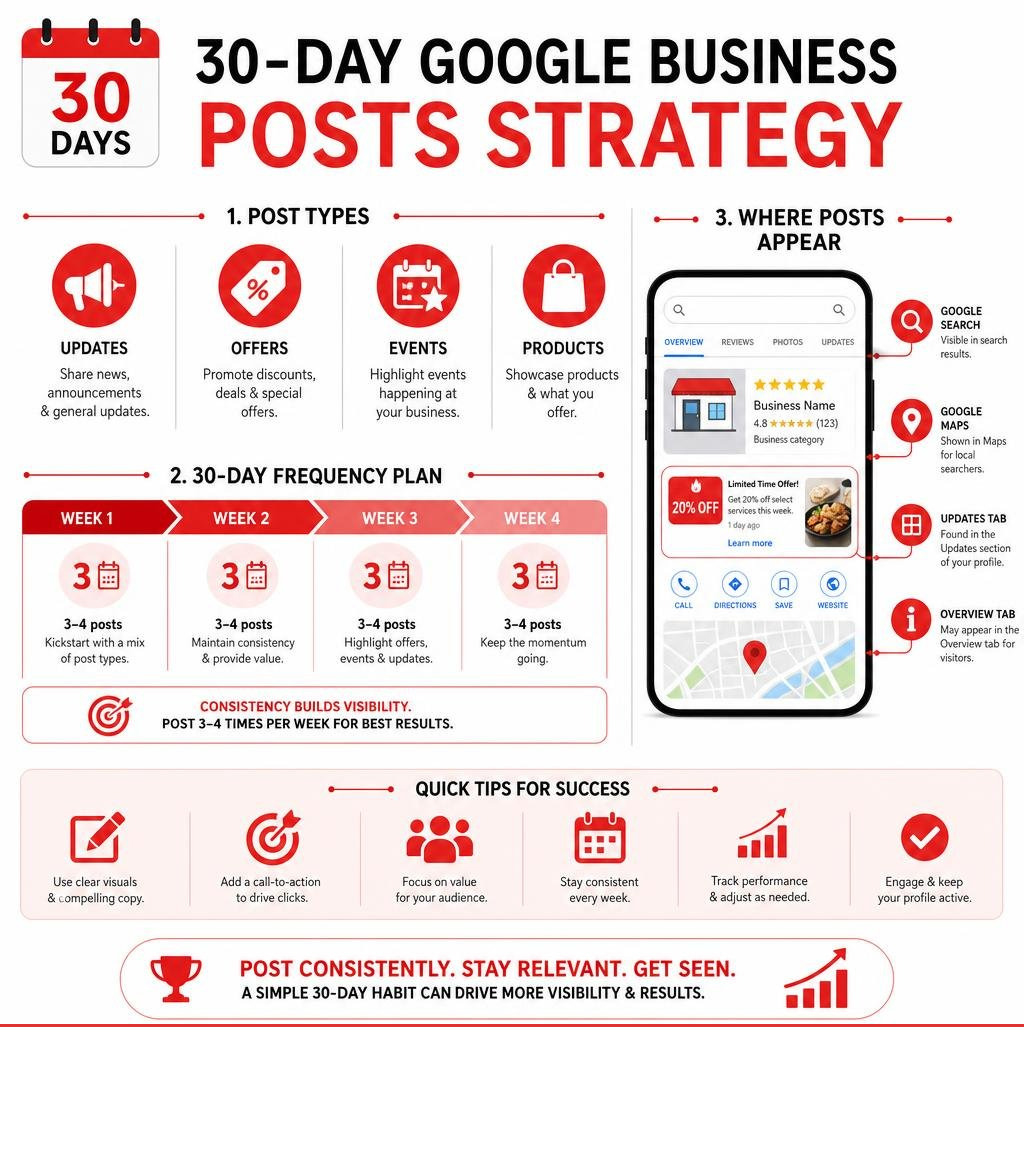
Google Business posts are short updates — offers, news, and events — that you publish directly to your Google Business Profile, where they appear in Google Search and Maps to people already looking at your business.
Here’s a quick overview of what they are and how they work:
| Feature | Details |
|---|---|
| What they are | Short text updates with images, videos, and a call-to-action button |
| Where they appear | Google Search, Google Maps, Updates tab, Overview tab |
| Post types | Updates, Offers, Events, Products |
| How long they last | Up to 6 months before archiving |
| Character limit | Up to 1,500 characters |
| Cost | Free |
Think of them as mini billboards — but smarter. Unlike social media posts that compete for attention in a crowded feed, Google Business posts reach people at exactly the right moment: when they’re already searching for a business like yours.
The numbers back this up. Listings with posts get 50% more impressions than those without. Posts with real (non-stock) photos generate 5.6x more clicks. And nearly half of all online shoppers are actively looking for a discount when they search — making Offer posts a direct line to ready-to-buy customers.
Yet most small business owners either don’t use this feature at all, or post once and forget about it.
That’s a missed opportunity. A consistent 30-day posting habit can meaningfully improve how your profile performs — and this guide will show you exactly how to build it.
I’m Rob Dietz, a digital marketing consultant with over 18 years of experience helping local businesses grow their online visibility, including managing Google Business posts and local SEO strategies since the early days of Google’s business listing tools. Let’s walk through everything you need to know to make your profile work harder for you.
Know your google business posts terms:
What Are Google Business Posts and Where Do They Appear?
When local customers search for your services, they want instant answers. Google Business posts provide exactly that, acting as direct announcements from your brand. When you publish a post, it doesn’t just sit in a hidden dashboard; it displays publicly across Google’s most popular consumer-facing platforms.
Specifically, your posts appear across both Google Search and Google Maps. On desktop, they are prominently showcased in the “From the owner” section of your Business Profile on the right-hand side of the search results page. On mobile devices, they are integrated seamlessly into several locations:
- The Overview Tab: Selected recent updates, particularly those with compelling visual media, can appear on the main overview of your profile to capture immediate attention.
- The Updates Tab: This acts as a dedicated social-like feed where users can scroll through your chronological history of announcements, offers, and events.
- Featured Posts: In certain search contexts, Google may highlight specific updates directly within local search results when they closely match the user’s intent.
By keeping these areas populated with fresh content, you ensure that anyone discovering your brand through Search or Maps sees an active, engaged, and trustworthy business. If you haven’t claimed your profile yet, you can get started by visiting Get Listed on Google – Google Business Profile.
The Different Types of Google Business Posts
To make the most of this feature, you must understand the distinct post types available. Google provides specific templates designed to match different business goals. Using the right post type ensures your content is formatted correctly and includes the most effective call-to-action (CTA) buttons:
- What’s New / Update Posts: These are your general announcements. Use them to share company news, highlight a new team member, showcase a completed project, or simply write a quick educational update about your services.
- Offer Posts: If you are running a promotion, discount, or sale, this is your go-to option. Offer posts require a title, start date, and end date. You can also add specific coupon codes, terms and conditions, and a direct link to redeem the offer online.
- Event Posts: Are you hosting a workshop, an open house, or a seasonal celebration? Event posts let you set a clear date range, start and end times, and a registration link so customers can easily sign up.
- Product Posts: These allow you to showcase specific products with photos and descriptions. They are excellent for highlighting your inventory and prompting searchers to shop directly from your profile.
Choosing the correct post type ensures that your audience gets the exact details they need to take action. For official step-by-step guidance on these categories, you can review the Create & manage posts on your Business Profile – Google Business Profile Help documentation.
Technical Requirements for Media and Content
While Google makes posting simple, you must adhere to strict technical guidelines to ensure your updates look professional and don’t get rejected by automated filters.
Images and videos are the lifeblood of high-performing Google Business posts. To keep your profile looking polished, use the following specifications:
- Image Size & Resolution: The recommended image size is 1200 x 900 pixels, maintaining a 4:3 aspect ratio. The minimum supported resolution is 400 x 300 pixels. File sizes should be between 10KB and 5MB in JPG or PNG format.
- Video Specifications: Videos must be at least 720p resolution, with a maximum file size of 75MB. The duration is strictly limited to 30 seconds or less.
- Text Limits: You can write up to 1,500 characters per post. However, the ideal length is much shorter — usually between 80 to 100 words (around 300-500 characters) — as text is truncated in the search preview, and users prefer quick, scannable updates.
| Post Type | Required Elements | Recommended CTA | Best Use Case |
|---|---|---|---|
| What’s New | Text, Image/Video | Learn More, Call Now | Company news, service highlights, educational tips |
| Offer | Title, Start/End Dates | View Offer | Sales, seasonal discounts, exclusive promotions |
| Event | Title, Start/End Dates & Times | Sign Up, Book | Classes, open houses, community gatherings |
| Product | Photo, Description | Shop, Order | Showcasing specific inventory or signature items |
Step-by-Step Guide to Managing Your Posts
Before you can publish your first post, your profile must be fully verified by Google. If you are still working on setting up or optimizing your profile, we recommend checking out our comprehensive Ultimate Google Business Profile Management Guide to ensure your foundations are solid.
Once verified, managing your posts involves a simple publishing workflow. However, you must remain highly aware of Google’s strict content policies. To prevent your posts from being rejected (marked as “Not approved”), avoid the following pitfalls:
- No Phone Numbers in Text: Do not write phone numbers inside the post description. Google’s automated systems often flag this as spam. Instead, use the official “Call Now” CTA button.
- Trusted Links Only: Any link you include must go to a safe, verified domain (ideally your own website). Avoid link shorteners or linking to low-quality third-party sites.
- Professionalism and Safety: Keep your language family-friendly, free of excessive punctuation (like “!!!”), and relevant to your business. Avoid any sensitive or regulated industry terms that might trigger automatic filters.
How to Create and Publish Google Business Posts
Publishing a post directly from your Google Business Profile dashboard is straightforward. Here is the standard manual process:
- Log in to the Google account associated with your business and search for your business name in Google Search.
- In the merchant menu that appears, click on Add update (or select the specific “Offer” or “Event” buttons).
- Choose your post type.
- Write your description (keeping the most important information in the first 100 characters before the “More” cutoff).
- Upload your high-quality, real photo or 30-second video.
- Select your Call to Action (CTA) button. Google supports several action types, including BOOK, ORDER, SHOP, LEARN_MORE, SIGN_UP, and CALL.
- Click Preview to see how it looks on mobile and desktop, then click Publish.
For businesses managing multiple locations or looking to automate this process programmatically, Google offers developer tools. You can explore technical integration options via the Create Posts on Google | Google Business Profile APIs | Google for Developers guide.
Editing, Scheduling, and Deleting Posts
After publishing, your post will enter one of three statuses:
- Live: The post is approved and visible to the public on Search and Maps.
- Pending: Google is currently reviewing the post for policy compliance (this usually takes just a few minutes).
- Not Approved: The post was rejected due to a policy violation (such as an included phone number or low-quality image).
If you need to make changes, simply find the post in your “Updates” tab, click the three dots (More menu) next to the post, and select Edit or Delete.
While Google’s native dashboard does not feature a built-in scheduling tool for future posts, you can manage your updates directly or publish them manually as needed. For a complete list of optimization steps, refer to Your Essential Google Business Profile Optimization Checklist.
Do Profile Updates Help with Local SEO and GEO?
A common question among business owners is whether publishing updates directly influences search rankings. The short answer is: google business posts do not act as a direct, primary ranking factor in Google’s core algorithm. However, they are incredibly powerful indirect ranking drivers.
When you post consistently, you send strong signals to Google that your business is active and reliable. This continuous activity encourages user engagement — such as clicks, website visits, and phone calls. Google monitors these engagement signals closely. A profile that receives regular clicks and interactions is far more likely to maintain high visibility in local search results than a stagnant profile that hasn’t been updated in years.
Furthermore, updates allow you to naturally weave relevant local keywords and service descriptions into your profile. When someone searches for a highly specific service, Google can pull “justifications” directly from your recent posts to show the searcher that you offer exactly what they need. To maximize this effect, keep your profile thoroughly optimized by following our Ultimate Guide to Google Business Profile Optimization.
SEO vs PPC in Local Search
To build a sustainable digital presence, it is important to understand how organic local optimization compares to Pay-Per-Click (PPC) advertising:
- PPC (Paid Ads): Paid search ads offer immediate visibility at the very top of search results. However, this visibility stops the moment you turn off your ad budget. It can also be costly over time.
- Local SEO (Organic): Optimizing your Google Business Profile and publishing regular updates builds long-term, compounding organic authority. It positions your brand in front of high-intent searches naturally.
While paid campaigns can generate quick leads, a comprehensive organic local SEO strategy is the ultimate foundation for high-ROI, long-term growth. It is important to set realistic expectations: a successful, highly competitive local SEO campaign typically takes 12 to 18 months to deliver its full, game-changing results. Consistency is key. To understand how to outpace your local competitors organically, explore these Killer GBP Growth Tactics for Dominating Local Search.
Generative Engine Optimization and AI Answers
The search landscape is undergoing a massive shift. With the rise of AI-powered search engines and Google’s Search Generative Experience, traditional lists of blue links are being replaced by direct, conversational AI answers. This evolution has introduced a new marketing discipline: Generative Engine Optimization (GEO).
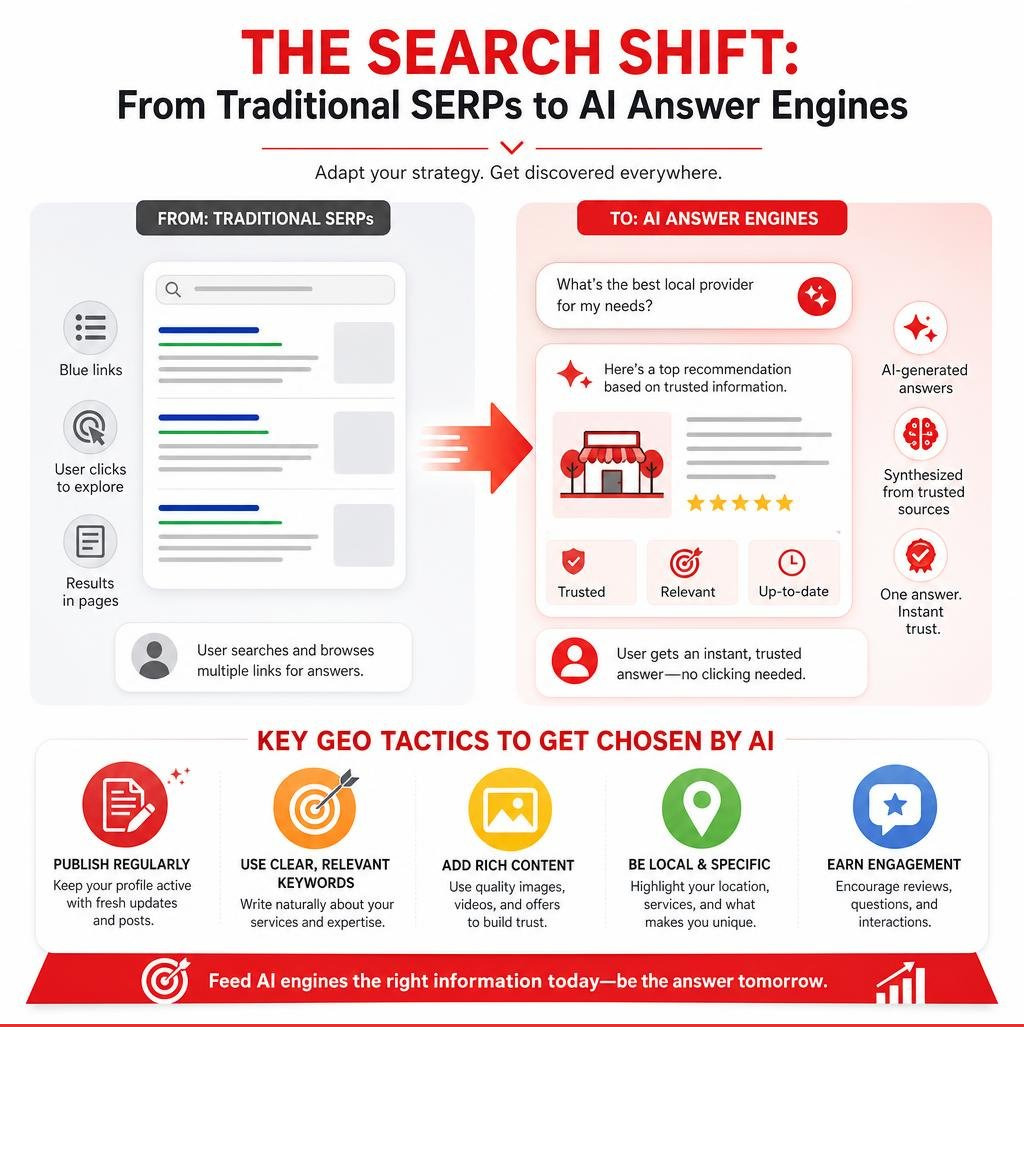
AI engines synthesize information from across the web to answer complex user queries instantly. To ensure your business is recommended within these AI-generated answers, you must feed the search engines structured, authoritative, and fresh data.
Regularly publishing google business posts is a vital GEO tactic. By writing clear, keyword-rich updates about your services, achievements, and offerings, you provide the exact structured context that AI models need to verify your brand’s authority. When an AI engine searches for a reputable local provider to recommend, your active posts serve as real-time proof of your expertise.
Best Practices for Writing High-Converting Updates
To turn casual searchers into paying clients, your posts must be written with conversion in mind. Here are our proven rules for creating high-converting updates:
- Lead with the Value: The first 80 to 100 characters are the most critical. Don’t waste them on generic introductions. Start with a hook — whether it’s a special offer, a major announcement, or a direct solution to a common customer problem.
- Use Real, High-Quality Photos: Avoid stock photography. Google posts that contain genuine, real-life images of your team, projects, or office get 5.6x more clicks than those using generic stock graphics.
- Include a Clear CTA: Every single post should have an action button. Tell the reader exactly what to do next, whether it’s “Learn More” to read a blog post, “Book” to schedule a consultation, or “Call Now” to speak with your team.
- Use Emojis Wisely: Emojis help break up text and add visual personality, making your posts highly scannable.
- Add UTM Tracking Links: To measure exactly how many website visits and conversions your posts generate, append UTM tracking parameters to your CTA links.
Content Ideas and Industry Examples
If you are wondering what to write about over your 30-day mastering period, here are highly effective, general content ideas that work across virtually any industry:
- Highlight a Recent Achievement: Share a milestone, such as an award, an anniversary, or a major project completion. This builds immediate brand authority and trust.
- Educational Quick Tips: Share a brief, helpful tip related to your industry. For example, explain how to identify a common maintenance issue or share a simple best practice.
- Introduce Your Team: People buy from people. Share a photo of a team member along with a short bio highlighting their dedication to customer service.
- Promote a Limited-Time Offer: Create a sense of urgency with an exclusive discount or a seasonal special.
- Behind-the-Scenes Sneak Peeks: Show your team hard at work. This authentic look behind the curtain builds deep customer connection.
Integrating Posts with Reviews and Chat
Your updates do not live in a vacuum. To maximize your profile’s conversion potential, you must integrate your posting strategy with other key interactive features, such as reviews and direct messaging.
When a customer leaves you a glowing review, don’t just reply to it — turn it into a post! Sharing a screenshot of a beautiful testimonial as an “Update” post is a highly effective way to leverage social proof. This builds immense trust with prospective clients who are actively researching your reputation. To keep your review stream active and professional, follow our guide on How to Manage Google Business Reviews Effectively.

Additionally, make sure you are available to answer the traffic your posts generate. By enabling direct messaging on your profile, customers who read your updates can immediately start a conversation with you. Learn how to manage these interactions seamlessly with our guide on How to Talk to Your Customers with Google Business Profile Chat.
Frequently Asked Questions about Local Posts
How long do local updates remain visible?
Historically, posts expired after seven days. However, under current Google guidelines, Google Business posts remain fully active and visible on your profile for up to six months before they are archived. Once archived, they are no longer displayed on your main profile tabs, but users can still view them by navigating to your historical update feed or clicking “View previous updates on Google.”
Offer and Event posts are bound by the specific date ranges you set when creating them; they will automatically expire and be archived as soon as the event or promotional period ends.
How can you measure the performance of your posts?
While Google does not provide deep, individualized analytics for every single post, you can track overall performance metrics directly through your Business Profile performance dashboard. Here, you can monitor search views (impressions) and direct clicks on your CTA buttons.
To gain precise insights, we highly recommend using UTM tracking codes on your CTA destination links. This allows you to track exactly how many leads, form submissions, or phone calls originate directly from your updates in your website’s analytics platform.
Do posts directly boost local search rankings?
No, posts do not directly boost your local search ranking positions. However, they are a powerful indirect ranking signal. Regularly publishing updates keeps your profile active, encourages user engagement, drives high-intent clicks, and introduces valuable service-related keywords to your profile. This continuous activity signals to Google that your business is active and authoritative, which helps maintain and improve your local search visibility over time.
Master Your Local Search Presence with Dietz Group
Building a consistent, high-converting posting habit on Google is one of the most effective, free ways to stand out in local search. But keeping up with weekly updates, review management, local SEO strategy, and the rapid shift toward AI search and GEO can quickly become overwhelming when you’re busy running a business.
At Dietz Group, we have over 18 years of digital marketing expertise. We provide comprehensive Local SEO, GEO, and SEM services designed to help your business dominate search results and generate high-intent leads. Our team uses cutting-edge AI technology and proven, high-ROI strategies to ensure your business is positioned exactly where your customers are looking.
Ready to take your local search presence to the next level? Let us handle the heavy lifting. Explore our professional Google Business Profile Management Services today, and let’s start driving more qualified leads to your business.