Your Google Business Profile Is Invisible Until You Verify It
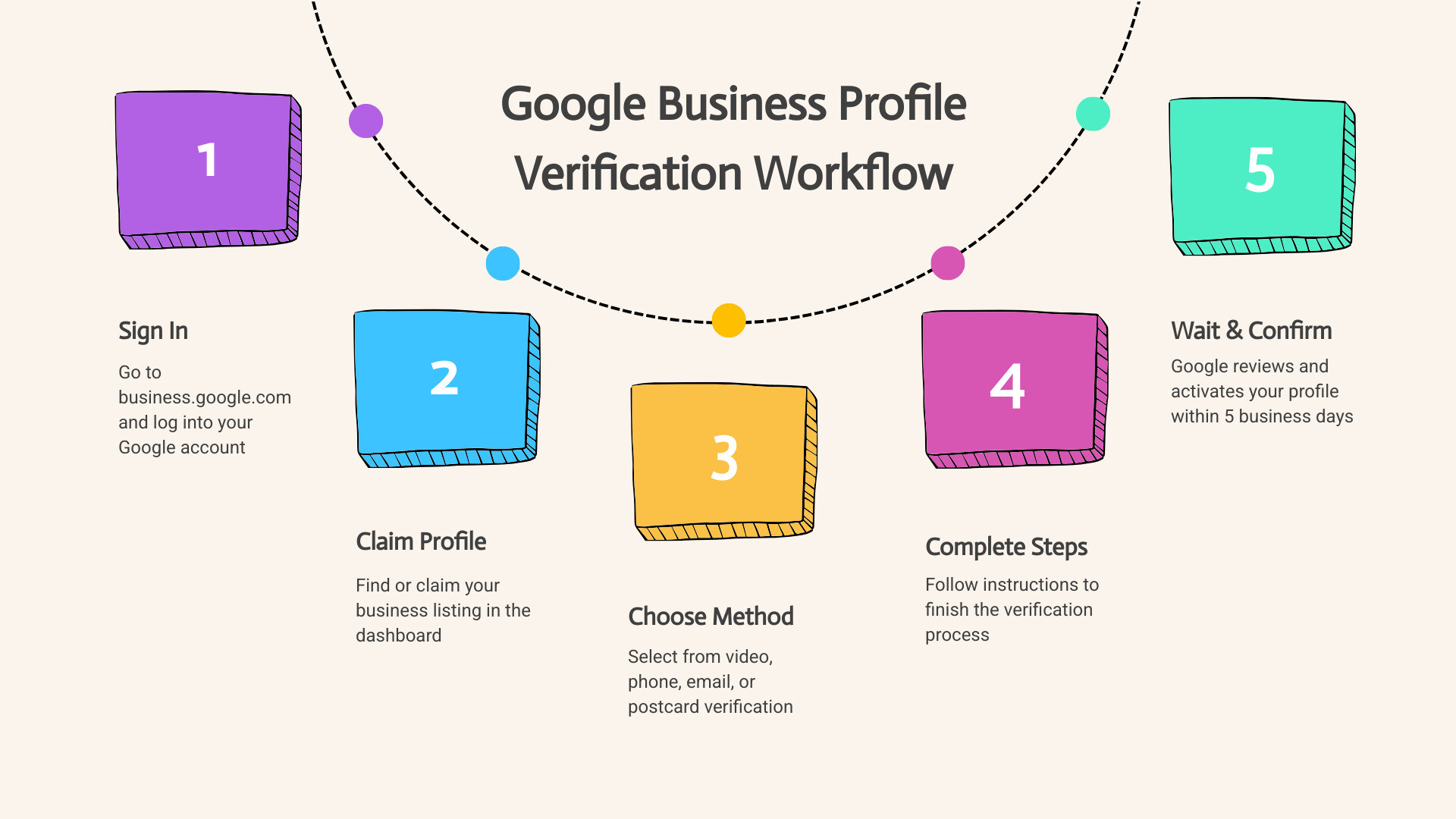
How to verify your Google Business Profile in 2026 comes down to five steps:
- Sign in at business.google.com
- Find or claim your business listing
- Select the verification method Google offers you (video, phone, email, or postcard)
- Complete the verification steps for that method
- Wait up to 5 business days for Google to confirm your profile
Until you do this, your profile cannot be edited, your business may not appear in Google Search or Maps, and customers simply cannot find you.
Think about that for a second. You may already have a Google Business Profile — but if it’s unverified, it’s essentially locked. You can’t update your hours, respond to reviews, or access insights showing how people find you. For some businesses, a verified profile drives over 40% of their leads. That’s a lot to leave on the table.
The good news? This guide walks you through every step — including the video verification method that has become the standard in 2026.
I’m Rob Dietz, founder of the Dietz Group and a digital marketing consultant with over 18 years of experience helping small businesses get found online. I’ve helped countless local business owners successfully google business profile verify their listings and turn them into real lead-generation tools — and I’ll show you exactly how to do the same.
Terms related to google business profile verify:
Why You Must Verify Your Listing in 2026
In the current landscape of 2026, verification isn’t just a “nice to have” feature; it is the gatekeeper to your digital existence. When you successfully google business profile verify your listing, you are signaling to Google that your business is legitimate, physical, and operational. Without this badge of authenticity, you are essentially a ghost in the local search results.
The stakes are higher than ever. Recent data shows that over 40% of leads for some service-based businesses come directly through their Google Business Profile. If you aren’t verified, those leads are going to your competitors. Furthermore, the way people search has fundamentally shifted. We are now in the era of Generative Engine Optimization (GEO).
As search engines move toward AI-driven answers, they prioritize data from verified, authoritative sources. If you want an AI agent to recommend your business to potential customers, your profile needs to be verified and fully optimized. Verification allows you to manage how you appear in both Search and Maps, ensuring your hours, services, and location are accurate for these AI systems. To learn more about the basics, check out our guide on What is a Google Business Profile?
Step-by-Step: How to Verify Your Google Business Profile

The journey to a verified profile starts with a simple login. You’ll need to Sign up for Business Profile or, if your business already appears on Maps but you don’t control it, you must Add or claim your Business Profile.
Once you have claimed the listing, the “Verify Now” button will become your best friend. In some lucky cases, if you have already verified your website through Google Search Console, you might qualify for instant verification. However, for most of us, Google will require a more hands-on approach to prove we are who we say we are.
Choosing the Right google business profile verify Method
Google, not the business owner, typically decides which verification methods are available for your specific profile. You may see one or several of the following options:
- Video Recording: The most common method in 2026. You record a continuous video of your business.
- Phone or SMS: Google sends a code to your registered business phone number.
- Email: A verification code is sent to a business-domain email address.
- Postcard: The “old school” method where a physical card is mailed to your business address.
- Live Video Call: A face-to-face virtual meeting with a Google representative.
For a deep dive into the official requirements for each, you can visit Verify your business on Google.
Checking Your Status and Timelines
Once you’ve submitted your verification details, the waiting game begins. It’s important to stay patient and avoid making major changes to your business name or address during this window, as this can trigger a reset of the process.
| Method | Typical Review/Arrival Time | Code Expiry |
|---|---|---|
| Video Recording | Up to 5 business days | N/A |
| Phone/SMS | Instant to minutes | 30 Minutes |
| Instant to minutes | 30 Minutes | |
| Postcard | Up to 14 days | 30 Days |
| Live Video Call | Instant upon completion | N/A |
You can Check your verification status at any time through your dashboard. If you see “Pending,” it means Google’s team (or their AI) is still reviewing your submission.
Mastering Video Verification: The 2026 Standard
By May 2026, video verification has become the primary way Google fights spam. It might feel a bit like filming a low-budget movie, but it’s highly effective. The key is to provide a single, unedited recording that is at least 30 seconds long.
You must record this video through the Google Business Profile interface on your mobile device; you cannot upload a pre-recorded video from your gallery. We recommend planning your “route” before you hit record to ensure a smooth, professional-looking submission. For more detailed strategies, read our Google Business Profile Video Verification Tips.
Proving Management and Ownership
To successfully google business profile verify via video, you need to show three specific things:
- Your Location: Film your street signs, nearby landmarks, or the exterior of your building.
- Your Business Name: Show permanent signage, such as the logo on your front door or a branded vehicle parked nearby.
- Proof of Management: This is where most people fail. You must show that you have access to non-public areas. This could mean unlocking the front door with your keys, opening a Point of Sale (POS) system, or showing a utility bill or business permit that matches your profile name.
For service-area businesses without a storefront, you can film your branded equipment, tools, and official registration documents instead of a physical office. You can find the official checklist at Verify your business with a video recording.
Troubleshooting Your google business profile verify Video
Technical glitches happen. If your video fails to upload, check your Wi-Fi or data connection and try again immediately. If your verification is “Not Successful,” don’t panic. Usually, it’s because the video didn’t clearly show proof of management or the location didn’t match Google’s records.
Common triggers for re-verification include changing your primary business category or moving to a new physical address. If you find yourself stuck in a loop, check out our guide on Challenges with Google Business Profile Video Verification.
Post-Verification: Optimizing for Long-Term Success
Congratulations! You’ve successfully navigated the google business profile verify process. But verification is just the starting line. Now that you have control, you need to use it.
At Dietz Group, we often discuss the balance between SEO vs PPC. While PPC (Pay-Per-Click) can get you immediate traffic, a verified and optimized Google Business Profile is the cornerstone of a sustainable Local SEO strategy. However, it’s important to set realistic expectations: a truly effective SEO campaign typically takes 12-18 months to show its full potential in dominating local search results.
Your next steps should include:
- Adding high-quality photos of your work and team.
- Responding to every customer review (both good and bad).
- Posting regular updates about offers or new services.
To ensure you haven’t missed anything, follow Your Essential Google Business Profile Optimization Checklist and dive into our Ultimate Google Business Profile Management Guide.
Frequently Asked Questions
Can I skip or delay the verification process?
Technically, you can leave a profile unverified, but we strongly advise against it. An unverified profile has zero discoverability in search results. You won’t be able to edit your business information, which means if your hours change, your customers will be misinformed. Verification is a requirement for ownership and control. If you’re still wondering how to get started, see How Do I Get a Google Business Profile?
How do I verify 10 or more locations at once?
If you are managing a franchise or a large chain, you don’t have to verify every location individually. Google offers a “Bulk Verification” process. You’ll need to use the “Chain Start” option within the Business Profile Manager and submit a spreadsheet of your locations. This generally requires you to be an authorized representative of the business. Detailed steps are available at Verify Business Profiles in bulk.
What should I do if my verification is denied?
If your attempt to google business profile verify is denied, Google will usually provide a reason or the “Get verified” button will simply reappear. Check your business name and address for any typos. Ensure you aren’t using a P.O. Box or a virtual office, as these are generally ineligible. If you’re still struggling, you may need to contact Google support or try these 3 Tips to Optimize Your Google Business Profile to ensure your data is clean.
Conclusion
The road to a verified Google Business Profile can feel like a maze, especially with the rigorous video requirements of 2026. However, it is the single most important step you can take to ensure your business is found by high-intent customers in your local area.
At Dietz Group, we specialize in helping businesses navigate these complexities. With over 18 years of expertise, we leverage AI technology and GEO-focused strategies to help our clients dominate local search results. We understand that a great SEO campaign is a marathon, not a sprint, and we are committed to driving high-ROI results for our clients over the long term.
If you’re ready to stop being invisible and start generating more leads, let us handle the heavy lifting. Explore our Google Business Profile Management Services and let’s get your business verified and optimized for success.