How to Manage Google Business Photos (Quick Guide)
Google Business Photos are the images that appear on your Google Business Profile in Search and Maps — and they’re one of the fastest ways to make a strong first impression on local customers.
Here’s what you need to know right now:
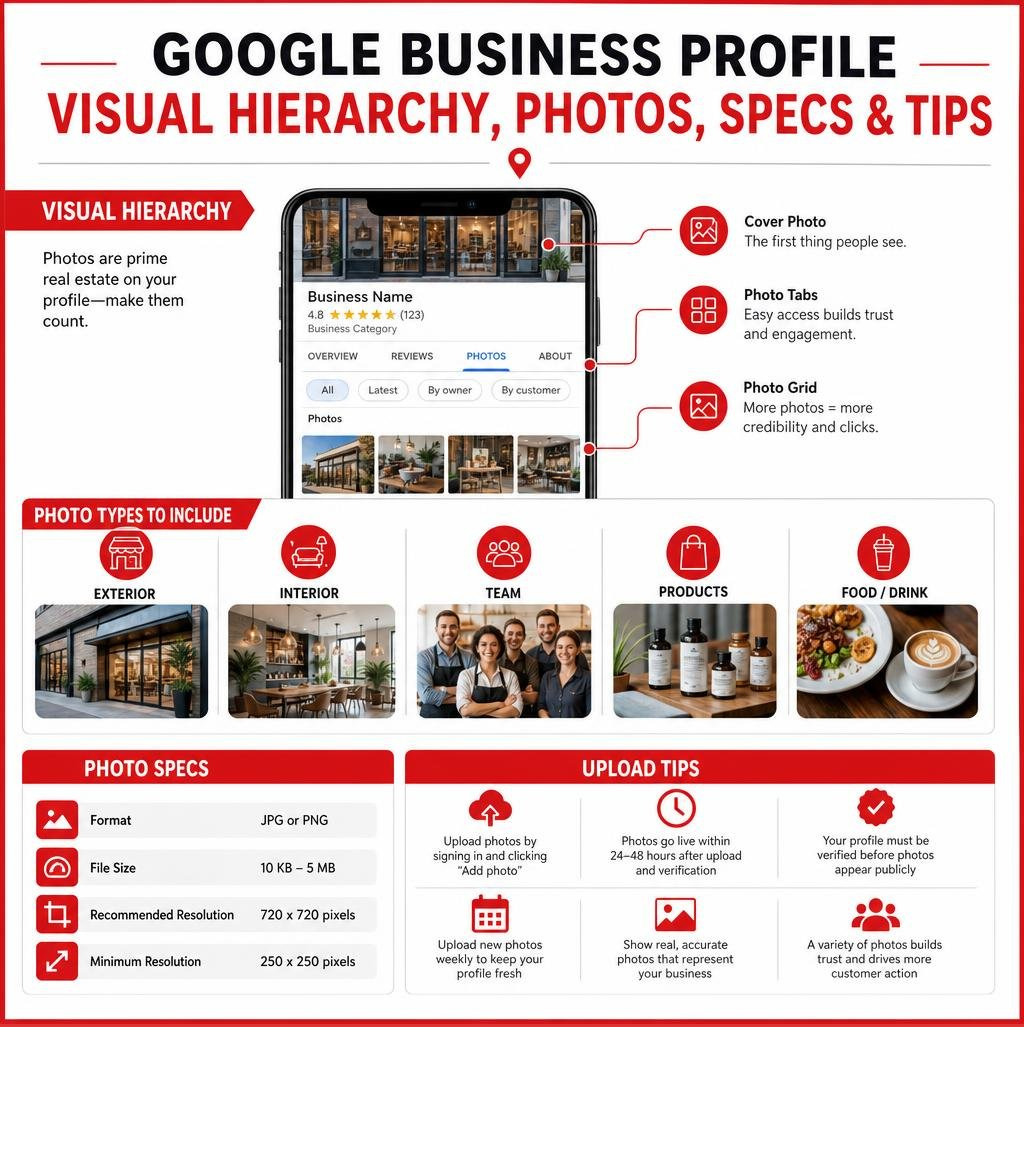
- Upload photos by signing into your Google Business Profile and clicking “Add photo”
- Accepted formats: JPG or PNG, between 10 KB and 5 MB
- Recommended resolution: 720 x 720 pixels (minimum 250 x 250 px)
- Photo types to include: exterior, interior, team, products, and food/drink
- Photos go live within 24-48 hours after upload and profile verification
- Upload frequency: Google recommends adding new photos weekly
- Your profile must be verified before any photos appear publicly
On average, a local business’s Google Business Profile features just 11 photos. That’s a low bar — and a real opportunity to stand out.
Consider this: Just Food For Dogs saw a 23.7% jump in profile visits and a 50% increase in click-through rate within 30 days of updating their Google Business Photos. Visuals move the needle in ways that text alone simply can’t.
In June 2026, local search is more competitive than ever. AI-powered answers are surfacing business information directly in search results, and your photos are part of what signals credibility to both customers and Google’s algorithms. A profile with rich, high-quality images tells the story of your business before a customer ever walks through the door.
I’m Rob Dietz, a digital marketing consultant with over 18 years of experience helping small businesses grow their online presence — including optimizing Google Business Photos as part of broader local SEO strategies. This guide walks you through everything you need to manage your profile’s visuals effectively.
Google business photos glossary:
What Are Google Business Photos and Why Do They Matter?
When potential customers look for local services, they want to see who they are dealing with before making contact. This is where your Google Business Profile comes in. It serves as your digital storefront. By using high-quality visual assets, you build immediate trust and establish a genuine brand identity.
If you are new to this process, it helps to understand the basics of What is a Google Business Profile and the step-by-step process of How to Get a Google Business Profile. Once your profile is active, managing your photos becomes a core part of your ongoing marketing efforts.
Visual assets do more than just make your listing look pretty. They directly impact your local search visibility and conversion rates. When searchers can see your physical location, your team, and your work, they are far more likely to take the next step and contact you.
The Difference Between Merchant and User-Generated Google Business Photos
Not all photos on your profile are created equal. Google divides your visual assets into two primary categories:
- Merchant Photos (Owner-Uploaded): These are the photos you upload yourself. You have complete control over these images, allowing you to showcase your brand in the best possible light. You can upload logos, cover photos, and specific category shots to set expectations.
- User-Generated Photos (Customer-Uploaded): These are photos uploaded by your customers when they leave reviews or check in. While you cannot directly control these images, they provide social proof and show your business from a customer’s perspective.
Managing both types of media is crucial for maintaining a balanced, trustworthy profile. For a deeper look at managing these files, you can refer to the official guide on how to Manage your Business Profile photos & videos – Google Help.
How Visual Content Powers Local SEO and Generative Engine Optimization (GEO)
Local search has evolved significantly. Today, we are seeing a massive shift toward AI-powered search answers and Generative Engine Optimization (GEO). AI search engines do not just read the text on your profile; they use advanced computer vision to analyze your images. They scan your photos to understand what your business does, where you are located, and the quality of your services.
This is where the difference between SEO and PPC becomes clear. While pay-per-click (PPC) advertising can bring immediate paid traffic to your site, a dedicated local SEO campaign builds long-term organic authority. A strong SEO and GEO strategy takes time — typically 12 to 18 months for full, sustainable results — but it establishes an organic foundation that keeps producing leads without a continuous ad spend.
Optimizing your photos is a critical piece of this puzzle. To learn more about how AI is reshaping search, explore our insights on AI and Local SEO GBP. If you find search engine optimization overwhelming, check out our guide on Google Business SEO for People Who Hate SEO.
Official Guidelines and Technical Requirements for Uploading Media
Before you start uploading, you need to make sure your files meet Google’s technical requirements. If your files do not fit these standards, Google’s automated systems may reject them immediately.

To ensure your uploads go smoothly, follow these official specifications:
| Media Type | Recommended Format | File Size | Recommended Resolution | Additional Requirements |
|---|---|---|---|---|
| Photos | JPG or PNG | 10 KB to 5 MB | 720 x 720 pixels | Well-lit, in focus, no heavy filters, minimal text |
| Videos | MP4 or MOV | Up to 75 MB | 720p or higher | Up to 30 seconds long |
For detailed, platform-specific instructions on uploading media from your mobile device, see Google’s guide on how to Manage your Business Profile photos and videos – Android – Google Business Profile Help.
Essential Categories of Google Business Photos to Include
To give searchers a complete picture of your business, Google recommends uploading category-specific photos. Instead of uploading dozens of identical shots, aim for variety across these core categories:
- Exterior Photos: Add at least three high-quality exterior photos taken from different angles and at different times of day. This helps customers recognize your building when they visit.
- Interior Photos: Upload at least three interior photos that capture the atmosphere, layout, and decor of your space.
- Team Photos: Include at least three photos of your management team and employees. Showing the human faces behind your brand builds immediate connection and trust.
- Photos at Work: Show your team in action. Capture three or more photos of your staff providing services or working on projects to demonstrate your expertise.
- Product or Service Photos: Add photos of your most popular products or representative services to show searchers exactly what you offer.
For more tips on category-specific imagery, check out the official resource on Tips for business-specific photos on your Business Profile – Google Business Profile Help.
Why Google Rejects Photos and How to Avoid Upload Failures
It can be incredibly frustrating to upload beautiful photos only to have Google flag them as “Not Approved.” Google uses automated AI filters to screen all media before it goes live.
Common reasons for photo rejection include:
- Poor Quality: Images that are blurry, dark, or heavily filtered will be flagged.
- Excessive Text: If text overlays or watermarks cover more than 10% of your image, Google will reject it. Keep text minimal and place it along the edges if necessary.
- Copyright Issues: Never use stock photography or images taken from other websites. All photos must be original.
- Unverified Profile: Your photos will not appear publicly until your profile is fully verified.
If you are struggling with the verification process, read our guide on How to Verify Your Google Business Profile Even If You’ve Never Tried It Before. If you are using video verification, make sure to check out our Google Business Profile Video Verification Tips as well as our breakdown of the common Challenges with Google Business Profile Video Verification.
Professional 360-Degree Imagery and Google Trusted Photographers
If you want to take your profile’s visual experience to the next level, you can implement 360-degree interactive imagery. This allows potential customers to take a virtual walkthrough of your space directly from Google Search or Maps.

This immersive approach is highly effective for retail spaces, offices, and service centers where the physical environment is a major selling point. You can learn more about how these assets look on the live map by visiting Business Photos – Google Maps.
Working with a Google Trusted Photographer or Agency
Creating a seamless 360-degree virtual tour requires specialized equipment, including fisheye lenses and rotating camera turrets. Because of this complexity, many businesses choose to hire a Google Trusted Photographer or an agency.
These professionals are independent contractors certified by Google to capture and stitch high-quality panoramic images. When you hire a Trusted Photographer:
- They will coordinate a professional shoot that typically takes about an hour.
- They will handle the technical processing, HDR rendering, and image stitching.
- You own the photos, while granting Google a license to display them across Google Maps and Search.
To learn more about how these professional shoots work, read the official FAQs – Business Photos – Google Maps.
How to Embed and Share Your Panoramic Photos
Once your professional 360-degree photos are live on Google Maps, you don’t have to keep them confined to Google’s platform. You can easily embed these interactive tours directly onto your business website or share them on your social media channels.
To embed a panoramic photo:
- Find your business’s 360-degree view on Google Maps.
- Click the three-dot menu icon in the top-left corner of the image.
- Select “Share or embed image.”
- Copy the HTML iframe code and paste it into your website’s editor.
This is a fantastic way to keep website visitors engaged and show off your physical space. For real-world examples of how businesses have used this feature to drive engagement, explore these Success Stories – Business Photos – Google Maps.
Frequently Asked Questions About Managing Google Business Photos
How long does it take for uploaded photos to appear live on Google Search and Maps?
In most cases, newly uploaded photos and videos will appear live on your profile within 24 to 48 hours. During this pending period, Google’s automated systems review the media to ensure it complies with content policies. That if your business profile is not yet verified, your photos will remain hidden from the public until verification is complete. For a visual walk-through of the upload process, watch this video on How to manage photos or videos for your Google Business Profile.
Can I control the order in which my photos appear on my profile?
No, Google does not allow businesses to manually arrange the order of their photos. Google’s algorithm dynamically determines which photos to display first based on user engagement, photo quality, and search relevance. To give your best images the highest chance of appearing first, make sure they are high-resolution, well-lit, and highly relevant to your core services. For a complete strategy on optimizing every element of your profile, check out our Ultimate Guide to Google Business Profile Optimization.
How do I remove unwanted or inappropriate user-generated photos?
If a customer uploads a photo that is inappropriate, irrelevant, or violates Google’s content policies, you can request its removal. To do this, find the photo on your profile, click the flag icon in the top-right corner, and select the appropriate reason for reporting it. Google’s team will review the request and remove the photo if it violates their guidelines. For more hands-on management strategies, read How to Manage Google Business Profile: 7 Methods That Guarantee Results.
Conclusion
Managing your google business photos is not a one-time chore; it is an ongoing asset for your local marketing. Regularly updating your profile with fresh, high-quality images signals to both customers and search algorithms that your business is active, reliable, and open for business.
At Dietz Group, we provide comprehensive digital marketing services — including Local SEO, GEO, and SEM — to help your business dominate local search results. With over 18 years of industry expertise, we combine cutting-edge AI technology with proven, high-ROI strategies to target high-intent searches.
While pay-per-click advertising can deliver immediate traffic, building true organic authority through SEO is a long-term investment that typically takes 12 to 18 months to show its full, compounding value. Let us handle the heavy lifting of managing your local presence. To learn how we can help you grow, explore our Google Business Profile Management Services today.